
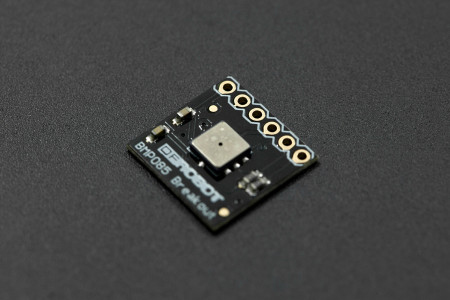
This project demonstrates how to send data to ThingSpeak using a SIM800L breakout board. The data will be coming from a BMP085 atmospheric pressure sensor and will be using the SIM800L GPRS connection to publish this data to ThingSpeak.
Setting up ThingSpeak
First, you need to sign-up for a free account on ThingSpeak. After successfully signing-up, you will be prompted to create a channel. Here is a screenshot of the channel I created:
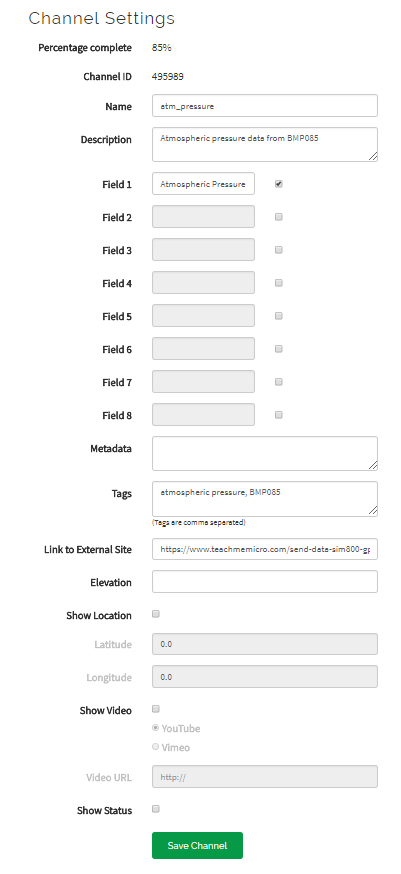
Here I only have one field named Atmospheric Pressure. You can have up to 8 fields.
Once the channel is created, go to the API keys tab:
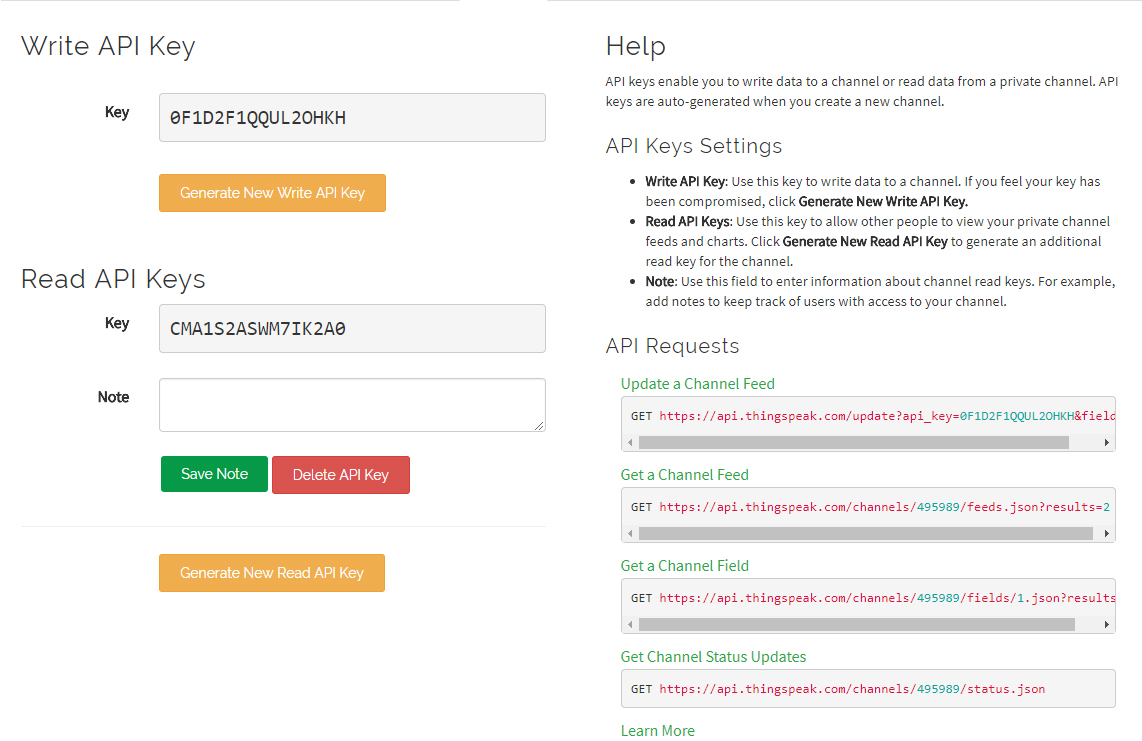
On the lower right, you have the API requests fields. Copy the URL for “Update a Channel Feed”. For example, mine is:
https://api.thingspeak.com/update?api_key=0F1D2F1QQUL2OHKH&field1=0This is the url used to update data on the channel. The last value on the url is the value to be sent to the channel. Here it says zero.
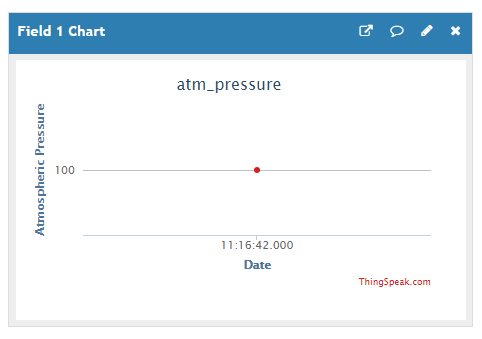
You can paste the url above on your browser and change the last number. For example, I paste this url:
https://api.thingspeak.com/update?api_key=0F1D2F1QQUL2OHKH&field1=100When I go see the Private View tab, the chart has now been updated:
Using Putty for Testing
Of course, we will not be using a browser to update the channel on ThingSpeak. We need to create HTTP requests via GPRS. But before that, we must know the correct HTTP request. For that we can simulate using Putty.
Open Putty, select Raw connection type and use api.thingspeak.com for Host Name and 80 for Port:
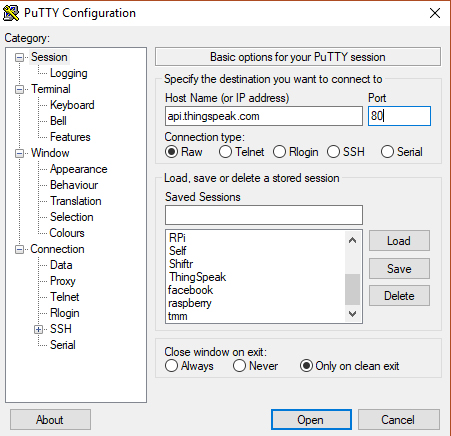
Open the session and type the following:
GET /update?api_key=0F1D2F1QQUL2OHKH&field1=2.8 HTTP/1.0Press enter three times; The Putty terminal window should close itself.
After that, check the Private View tab again on ThingSpeak. The chart should now be updated:
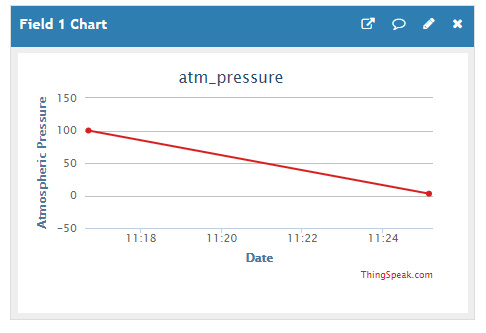
The line drops from 100 to almost 0. This is because the data value written using Putty is 2.8.
Sending Data via GPRS Connection with SIM800L
Now that we’ve confirmed that the HTTP request works, we start using an Arduino and SIM800L. I will still be using Adafruit’s FONA library just like my other SIM800L articles. Also, since I’m using the BMP085, I used Adafruit’s library as detailed in my BMP085 tutorial.
Wiring Diagram
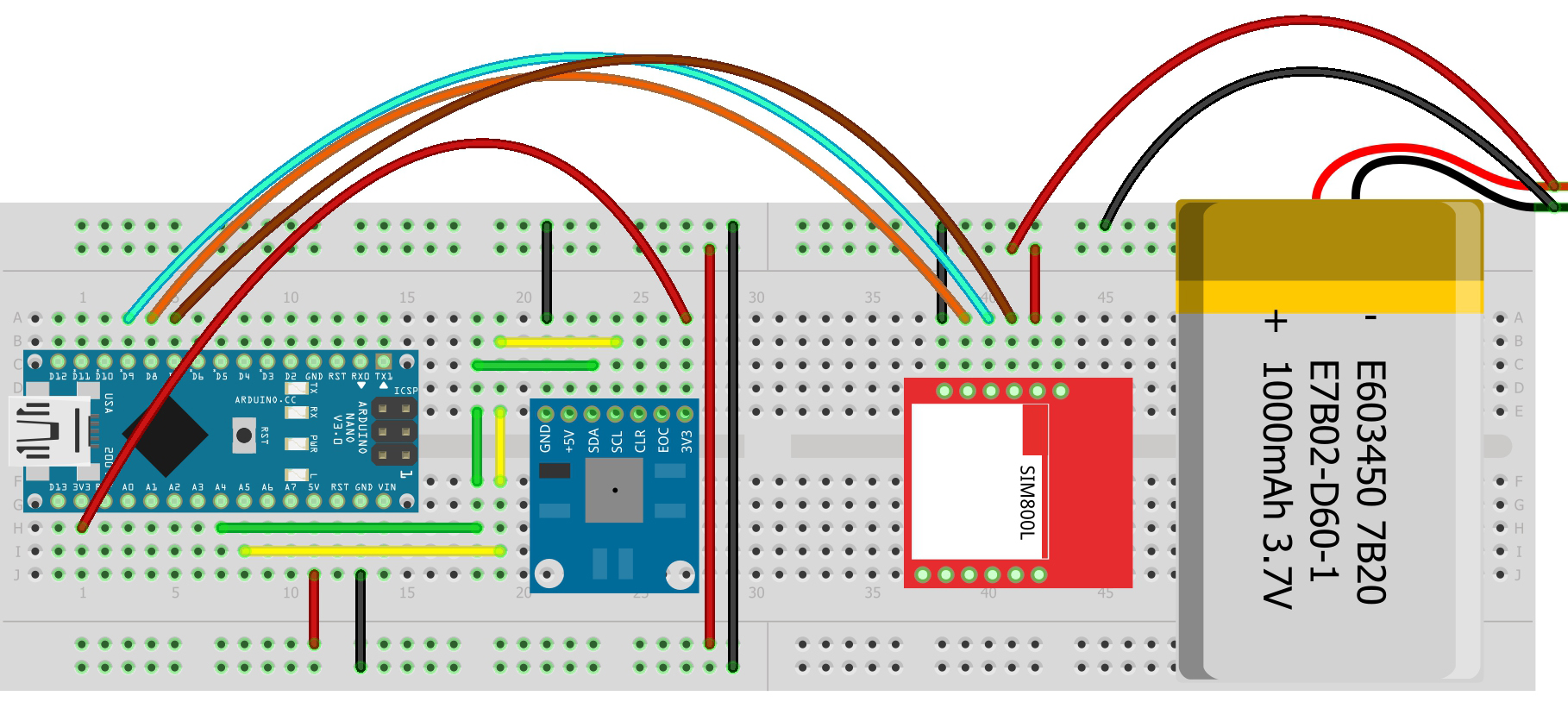
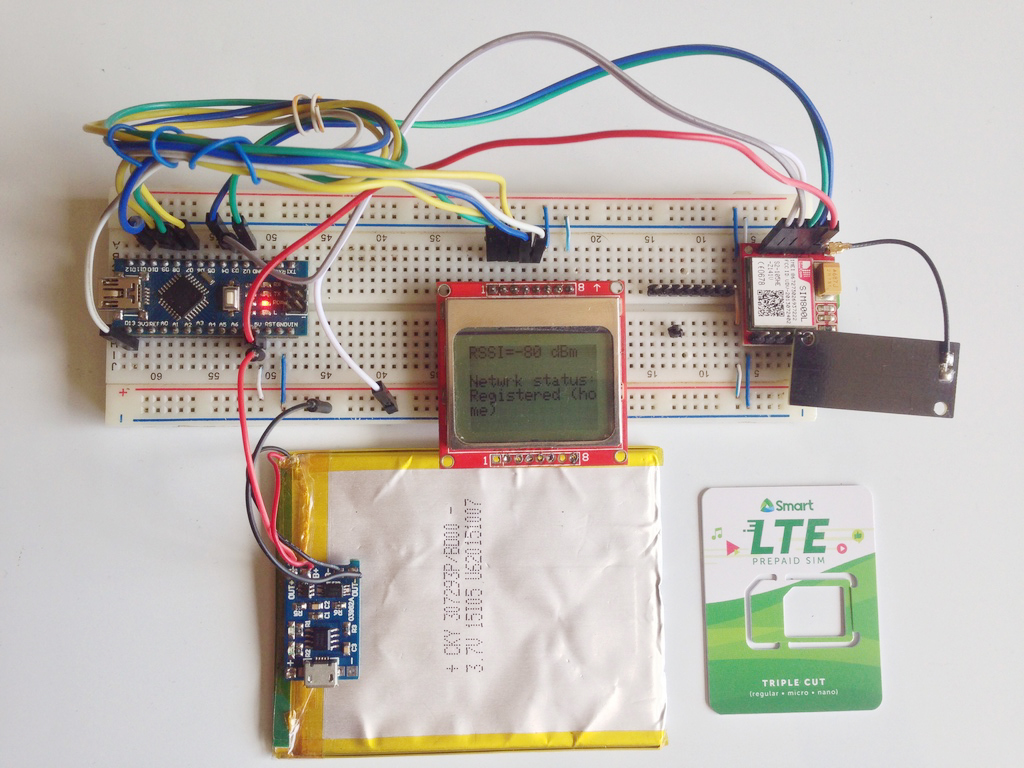
This is how I connected the Arduino, SIM800L and BMP085:
| SIM800L TX | D8 |
| SIM800L RX | D9 |
| SIM800L RST | D7 |
| SIM800L VCC | 3.7V BAT |
| SIM800L GND | 3.7V GND / Arduino GND |
| BMP085 SDA | A4 |
| BMP085 SCL | A5 |
| BMP085 VCC | Arduino 3.3V |
| BMP085 GND | Arduino GND |
| Arduino 5V | 3.7V BAT+ |
Here’s the Fritzing diagram:
Arduino Sketch:
Sketch: Sending Atmospheric Pressure Data to ThingSpeak via SIM800L GPRS

By Roland Pelayo

Wiring:

  SIM800L TX -> D8
  SIM800L RX -> D9
  SIM800L RST -> D7
  SIM800L VCC -> 3.7V BAT+
  SIM800L GND -> 3.7V GND / Arduino GND
  BMP085 SDA -> A4
  BMP085 SCL -> A5
  BMP085 VCC -> Arduino 3.3V
  BMP085 GND - > Arduino GND
  Arduino 5V -> 3.7V BAT+

Full tutorial on: https://www.teachmemicro.com/send-data-sim800-gprs-thingspeak

*/

#include <Wire.h>
#include <Adafruit_BMP085.h>
#include <SoftwareSerial.h>
#include "Adafruit_FONA.h"

#define FONA_RX 9
#define FONA_TX 8
#define FONA_RST 7

SoftwareSerial SIM800ss = SoftwareSerial(FONA_TX, FONA_RX);
Adafruit_FONA SIM800 = Adafruit_FONA(FONA_RST);
Adafruit_BMP085 bmp;


int LED = 13;

char http_cmd[80];
char url_string[] = "api.thingspeak.com/update?api_key=0F1D2F1QQUL2OHKH&field1";
char atm_pressure_string[20];
double atm_pressure;
int net_status;

uint16_t statuscode;
int16_t length;
String response = "";
char buffer[512];

boolean gprs_on = false;
boolean tcp_on = false;

void setup() {
  pinMode(LED, OUTPUT);
  while (!Serial);

  Serial.begin(115200);

  Serial.println("Atmospheric Data to ThingSpeak");
  Serial.println("Initializing SIM800L....");

  SIM800ss.begin(4800); // if you're using software serial

  if (! SIM800.begin(SIM800ss)) {
    Serial.println("Couldn't find SIM800L");
    while (1);
  }

  Serial.println("SIM800L is OK");
  delay(1000);

  if (!bmp.begin()) {
    Serial.println("Could not find a valid BMP085 sensor, check wiring!");
    while(1);
  }

  Serial.println("Waiting to be registered to network...");
  net_status = SIM800.getNetworkStatus();
  while(net_status != 1){
     net_status = SIM800.getNetworkStatus();
     delay(2000);
  }
  Serial.println("Registered to home network!");
  Serial.print("Turning on GPRS... ");
  delay(2000);
  while(!gprs_on){
    if (!SIM800.enableGPRS(true)){
        Serial.println("Failed to turn on GPRS");
        Serial.println("Trying again...");
        delay(2000);
        gprs_on = false;
    }else{
        Serial.println("GPRS now turned on");
        delay(2000);
        gprs_on = true;
    }
  }
}

void loop() {
    digitalWrite(LED, LOW);
    atm_pressure = bmp.readPressure();
    dtostrf(atm_pressure, 5, 0, atm_pressure_string);
    sprintf(http_cmd,"%s=%s",url_string,atm_pressure_string);
    delay(2000);
    while(!tcp_on){
      if (!SIM800.HTTP_GET_start(http_cmd, &statuscode, (uint16_t *)&length)) {
           Serial.println("Failed!");
           Serial.println("Trying again...");
           tcp_on = false;
      }else{
        tcp_on = true;
        digitalWrite(LED, HIGH);
        while (length > 0) {
           while (SIM800.available()) {
             char c = SIM800.read();
             response += c;
             length--;
           }
        }
        Serial.println(response);
        if(statuscode == 200){
          Serial.println("Success!");
          tcp_on = false;
        }
        digitalWrite(LED, LOW);
      }
      delay(2000);
    }
    delay(2000);
}
The sketch follows a specific sequence to be able to send data to ThingSpeak successfully. First, the SIM800L must be turned on. This is checked here:
if (! SIM800.begin(SIM800ss)) {
   Serial.println("Couldn't find SIM800L");
   while (1);
}

Serial.println("SIM800L is OK");
delay(1000);
If the SIM800L is not connected, the sketch goes to the while(1) loop and will not proceed.
Next, we check if the BMP085 is connected:
if (!bmp.begin()) {
  Serial.println("Could not find a valid BMP085 sensor, check wiring!");
  while(1);
}
Similarly, the sketch will not continue down if there is no BMP085 connected.
Next, we must make sure the SIM800L is connected to the network. I created a loop that checks the network status until it is registered to the home network:
Serial.println("Waiting to be registered to network...");
net_status = SIM800.getNetworkStatus();
while(net_status != 1){
   net_status = SIM800.getNetworkStatus();
   delay(2000);
}
Serial.println("Registered to home network!");
When the SIM800L is now connected to the home network, it’s time to turn on GPRS:
Serial.print("Turning on GPRS... ");
delay(2000);
while(!gprs_on){
  if (!SIM800.enableGPRS(true)){
      Serial.println("Failed to turn on GPRS");
      Serial.println("Trying again...");
      delay(2000);
      gprs_on = false;
  }else{
      Serial.println("GPRS now turned on");
      delay(2000);
      gprs_on = true;
  }
}
Again, this is looped to make sure that GPRS is on before proceeding.
Inside the loop() function, the pressure data is read and then converted to char array:
atm_pressure = bmp.readPressure();
dtostrf(atm_pressure, 5, 0, atm_pressure_string);
The dtostrf() function accepts the double number, whole number precision, fraction precision and the char array to which the converted value is stored.
Next, the pressure value is concatenated to the API URL:
sprintf(http_cmd,"%s=%s",url_string,atm_pressure_string);To make an HTTP request, we use the HTTP_GET_start function:
SIM800.HTTP_GET_start(http_cmd, &statuscode, (uint16_t *)&length)The http_cmd is a char array that contains the API URL and the pressure value. Statuscode is an integer that stores the server response and length is the length of the response. I placed this function inside a loop:
  while(!tcp_on){
      if (!SIM800.HTTP_GET_start(http_cmd, &statuscode, (uint16_t *)&length)) {
           Serial.println("Failed!");
           Serial.println("Trying again...");
           tcp_on = false;
      }else{
        tcp_on = true;
        digitalWrite(LED, HIGH);
        while (length > 0) {
           while (SIM800.available()) {
             char c = SIM800.read();
             response += c;
             length--;
           }
        }
        Serial.println(response);
        if(statuscode == 200){
          Serial.println("Success!");
          tcp_on = false;
        }
        digitalWrite(LED, LOW);
      }
      delay(2000);
    }
The string Success! Is printed on the serial monitor when a status code of 200 is received, which is the OK status.
The project continues to send data to the ThingSpeak server unless the GPRS connection is cut off.
Here’s a video of the project:
I hope this project is useful to you! Please drop a comment below!

Can i use SIM900A gsm module instead of sim 800L module and what are the changes which i have to do regarding this.Please reply as soon as possible
yes, that would be great
yes, i also want to know if that is possible/not
please make tutorial subscribe data from io adafruit via gprs connection sim 800L please sir 🙁
I will, very soon
Thank you so much, It's been helpful.
if i use SIM 800L can i still send the data to web server ??
Can i send more than one variable to the thingspeak? How it will works?
Thanks,
Bruno.
hey dear, i want to update multiple fields at same time. how can i do it?
When I put APN name, user, password, etc. for the company of SIM card?
Line 36
\libraries\Adafruit_FONA-master\Adafruit_FONA.cpp
Hello there Roland. Nice tutorial. I wanted to ask how did you add the APN of your SIM card. Did you add it in the adafruit fona library. Will appreciate your response
Line 36
\libraries\Adafruit_FONA-master\Adafruit_FONA.cpp
Very very useful tutorial!
So this here is a typical fraud. How you send data from 5 v uart to 3.3 v uart? if you go on sim800 l datasheet you will se that it only receives 3.3 v uart communication. Its more than miracle how you achieved that.
Hi,
There's no miracle actually. If you looked at my diagram, you'll see that I'm using a 3.7 V battery, so the Arduino here is not really producing 5V out of its UART.
Can this program work on the simcomm 5320e for sending a post request to a python API?
If we modify Http get start() to Http post Start() according to the fona library
Hi Roland,
Thank you for the tutorial!
I am using BME 280 sensor instead of DHT. I am sending the data to my thingspeak channel.
Although I am not able to get my GPRS working.
Here is my serial monitor response.
Failed to turn on GPRS
Trying again...
---> AT+CIPSHUT
AT+CGATT=1
AT+SAPBR=3,1,"CONTYPE","GPRS"
AT+SAPBR=3,1,"APN","Vodafonemobileconnect"
AT+CSTT="Vodafonemobileconnect"
AT+SAPBR=1,1
<--- ERROR
The code is stuck inside the while loop.
I am sure there is no power supply issue, because I can connect my GPRS using the AT commands, but I want to try using Adafruit fona library.
Also, an interesting happens after I let the code run for some time.
The LED on the sim800L starts to blink at a faster rate( like when it is connected to the GPRS)
Sir, i did the same with temperture sensor. but i get the sensor value as statically not dynamically what to do?
Check out how to use AJAX for dynamic data.
Great thanks. I tried this project and was successful. Very very thank you. Although I edited my way but this project helped me to understand. Thanks again.
hi man, thank you for this great work it was very helpful for me.
but I've faced a problem
i got this error
---> AT+HTTPTERM
AT+HTTPINIT
AT+HTTPPARA="CID"
AT+HTTPPARA="UA"
AT+HTTPPARA="URL"
AT+HTTPACTION=0
AT+HTTPREAD
<--- OK
Failed!
Trying again...
why is this happening?
when I remove the https:// for thingspeak api url the channel get a single data every 3 minutes with an error in serial
please help me, and thanks alot
Sorry, I can't help you with your problem unless you give me more information about your project.
Hi,
Can I use my own server to show data using mysql?
I have created a script like website.com/update.php?field1=11&field2=22
Working fine in url bar I can see data in mysql. But in arduino not working.
Can you help?
I am not sure what you want here but it looks like you want to issue POST commands using Arduino. I suggest you use HTTP requests which can be inserted as string in an arduino sketch with internet functions. This is an example request:
POST update.php HTTP/1.1
User-Agent: Mozilla/4.0 (compatible; MSIE5.01; Windows NT)
Host: website.com
Content-Type: application/x-www-form-urlencoded
Content-Length:
Accept-Language: en-us
Accept-Encoding: gzip, deflate
Connection: Keep-Alive
field1=11&field2=22
when i test that code i get responses "+CPIN: NOT INSERTED",ERROR please help me!
it's now added. Thanks!
Hi,
Is your SIM good if inserted in a phone? If it is, it might be a power problem. Make sure you use the recommended power supply for the module.
hi...is posible with mqtt ?
Thanks for the tutorial. Really helped
sir, when uploaded code to Arduino following, is shown on the serial monitor. I guess there is a problem with the network. how to solve please help.
Data to ThingSpeak
Initializing SIM800L....
Attempting to open comm with ATs
---> AT
AT
AT
AT
AT
AT
ATE0
ATE0
AT+CVHU=0
ATI
AT+CPMS="SM","SM","SM"
AT+CREG?
AT+CREG?
AT+CREG?
<--- +CREG: 0,2
Sir,
if i want to set up TLS connection(TCP/HTTP) using pre shared keys(PSK) from sim 800 .How do i use those PSK ?which AT command i have to use?I am using Putty terminal ..I followed the sim 800 SSl application note..but it did not work for me.
I tried sending PSK using AT+HTTPPARA="USERDATA","" it didn't work,I created file with psk keys and saved it on GPRS modem but AT+SSLSETCERT="" didn't work..please help me with this
Hello Sir,
I want to send the AT commands output to the TCPIP server. (i.e. IMEI,IMSI). How to send it to the server. I tried in many way but can't successful.
please help me fo rthis.
Thanks In Advanced.
this is a very intersting project.
But may i know which part is the data being uploaded?
And also is is possible to upload two parameters?
How can i send dc voltage reading to thingspeak using this setup?
Dear friend,
This is working nicrly. Great stuff. I want to update 3 fields to thinkspeak channel. What changes should i do?
Mahesh.