Modern building access control involves more than locking and unlocking doors. Offices, schools, healthcare facilities, warehouses, residential properties, and other commercial buildings may have dozens or hundreds of access points, each with different security requirements. Managing those points consistently requires a system that can process credentials, communicate with connected devices, and apply predefined access rules.
This is where controller boards become an important part of an access control system. They sit between many of the physical devices installed at a door and the software or management platform responsible for defining access permissions. When someone presents a credential, the system needs to determine whether that person should be allowed through and then communicate the appropriate response to the door hardware.
1. Connecting Different Access Control Components
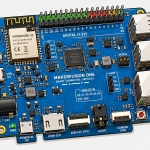
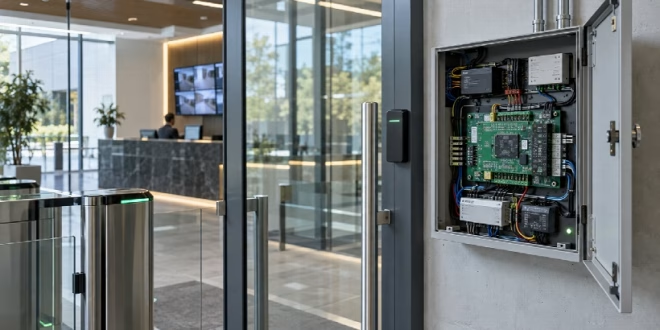
At the center of many electronic access systems are controller boards that communicate with devices installed throughout a building.
A typical controlled door may include a card or credential reader, electronic lock, door position sensor, request-to-exit device, and other inputs or outputs. The controller provides a point where these components can communicate with the broader access control system.
For example, when an employee presents a credential at a reader, the reader sends information to the controller. The controller can then use the configured rules to determine the appropriate response and activate the relevant door hardware.
This architecture allows different components to work together instead of operating as isolated devices.
The National Institute of Standards and Technology provides guidance on physical access control as part of broader operational technology security. Its Guide to Operational Technology Security explains how physical access controls can form part of a connected operational environment.
2. Processing Access Decisions
An access control system needs a reliable way to apply authorization rules.
Not every credential should provide access to every area. An employee might be allowed into a general office area but restricted from a server room, equipment storage area, or executive space.
Applying Defined Rules
Controllers can receive credential information and communicate with the access management software or database to determine whether access should be granted.
Rules may consider factors such as:
- User identity
- Assigned access group
- Door or location
- Date
- Time
- Temporary permissions
- Security status
This allows organizations to create access policies that reflect how their facilities actually operate.
For instance, an employee could receive access to an office from 7 a.m. to 7 p.m., while a maintenance worker might receive access to specific service areas during scheduled hours.
3. Supporting Multiple Doors and Access Points
Large facilities may have many doors that require electronic access control.
A controller-based architecture can help organizations manage multiple access points through a coordinated system rather than treating each door as a completely independent installation.
Scaling the System
Consider a multi-floor office building with controlled access at:
- Main entrances
- Employee entrances
- Parking areas
- Server rooms
- Storage rooms
- Conference areas
- Restricted administrative offices
As the number of access points increases, consistent management becomes increasingly important.
A scalable architecture allows organizations to add access points as building requirements change while maintaining centralized policies and administration.
The exact architecture will depend on the number of doors, system design, communication requirements, and the organization's security objectives.
4. Managing Inputs From Door Hardware
Controller boards do more than process credentials. They can also receive information from devices connected to the door.
A door position sensor, for example, can indicate whether a door is open or closed. A request-to-exit device can communicate that someone is leaving through an authorized route.
Understanding Door Status
These inputs can help the access control system respond to situations that require attention.
For example, if a secured door remains open longer than expected, the system may generate an event for security personnel to review. The appropriate response depends on the configuration and the organization's policies.
This type of monitoring can provide useful context beyond simply recording whether a credential was accepted or rejected.
5. Supporting Security Events and Alerts
Access control systems can generate a variety of events.
These may include successful access attempts, denied credentials, forced doors, doors being held open, communication failures, or other system conditions.
Using Events for Situational Awareness
Security teams can review these events to identify activity that requires investigation.
Suppose several denied access attempts occur at a restricted door outside normal operating hours. That activity may warrant additional investigation depending on the facility's security procedures.
Event records can also help during post-incident reviews by providing a timeline of access-related activity.
However, access logs should be considered alongside other information, such as video surveillance, alarm records, and reports from personnel. No single source necessarily provides a complete picture of an incident.
6. Supporting Temporary and Scheduled Access
Not every person who needs building access should receive permanent permissions.
Contractors, visitors, temporary workers, and service providers may require access for a limited period.
Set Access Around Actual Requirements
A controller-based system can support access policies that are limited by time, location, or user group.
For example, a contractor scheduled to perform maintenance on Tuesday could receive access to a specific service area during the approved work period. Once the assignment ends, that permission can be removed.
This reduces the need to provide broad, long-term access to people who only require temporary entry.
Organizations should also establish procedures for reviewing temporary credentials so that they do not remain active longer than necessary.
7. Supporting Integration With Other Systems
Building security rarely consists of a single technology.
Access control may operate alongside video surveillance, intrusion detection, elevator controls, visitor management, alarms, and other building systems.
Connecting Security Information
When systems can exchange relevant information, security personnel may gain better visibility into events.
For example, an access event at a restricted entrance could be associated with video from a nearby camera. Similarly, an alarm condition could trigger a predefined response within the access control environment.
Integration should be designed carefully. Connected systems create dependencies, and security teams need to understand how devices communicate, what networks they use, and how administrative access is protected.
8. Supporting System Resilience
Building access systems need to continue operating reliably even when individual components encounter problems.
Power interruptions, network failures, damaged devices, or controller communication issues can affect normal operations.
Plan for Failure Conditions
Facility managers should understand how the access control system is designed to respond when communication or power is interrupted.
Depending on the location and life-safety requirements, different doors may need different behaviors. Emergency exits, for example, must be managed according to applicable safety requirements.
Organizations should document procedures for system failures and test relevant scenarios where appropriate.
Testing can reveal whether backup power, communications, administrative procedures, and emergency operations work as intended.
9. Protecting Controller Infrastructure
Because controller boards can sit at an important point within an access control architecture, protecting the infrastructure around them is essential.
Physical access to controllers should be restricted to authorized personnel. Network connections should also be appropriately protected, particularly when controllers communicate with centralized management platforms.
Limit Administrative Access
Only authorized administrators should be able to modify system settings, access rules, or configurations.
Organizations should also maintain appropriate records of administrative changes and review them when necessary.
Software and firmware should be maintained according to established maintenance procedures. Unsupported or outdated components can create operational and security concerns, particularly when they communicate with other connected systems.
10. Maintaining Accurate Access Policies
Technology alone cannot keep a building's access control system effective.
The rules configured within the system need to reflect the organization's current operations.
Employees change roles. Departments move. New areas are added. Contractors complete projects. Buildings may expand or change their operating hours.
Review Permissions Regularly
Regular reviews should examine whether:
- Former employees still have active credentials
- Temporary users still require access
- Employees have permissions appropriate to their roles
- Restricted areas have the correct access groups
- Administrative accounts are still necessary
- Access schedules reflect current operating hours
These reviews can help identify outdated permissions before they become a larger administrative or security issue.
Conclusion
Controller boards provide an important connection point within modern building access control systems. They can communicate with readers, locks, sensors, and other devices while helping apply the access rules established by the broader system.
Their role becomes especially important as buildings add more doors, users, security technologies, and operational requirements. A well-designed system should not only control entry but also support monitoring, temporary access, event management, integration, and resilience.
Ultimately, effective building access control depends on the complete system rather than any individual component. Appropriate hardware, clear policies, regular access reviews, secure administration, and well-planned maintenance all contribute to a reliable approach to managing physical access.
FAQs
1. What is a controller board in an access control system?
A controller board is a component that communicates with devices such as credential readers, electronic locks, door sensors, and request-to-exit devices. It helps process access information and coordinate the response based on rules configured within the broader access control system.
2. Can controller boards support multiple doors?
Yes, depending on the system architecture and controller configuration. Controller-based systems can be designed to manage multiple access points and connect those points to centralized access management. The number of doors supported depends on the hardware, system design, and facility requirements.
3. Why should access control systems be reviewed regularly?
Regular reviews help ensure that permissions still match current responsibilities. Employees may change roles, contractors may finish assignments, and building requirements may change. Reviewing credentials and access rules can identify outdated permissions and help keep the system aligned with current operations.