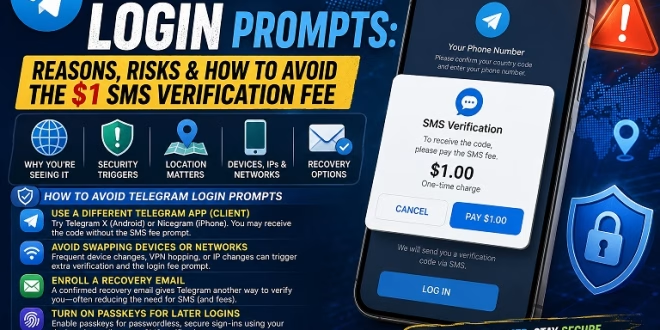
Some Telegram users have been encountering a prompt lately asking them to pay a $1 SMS verification fee when they log in to their accounts. And no, not all receive this prompt. It seems to be showing up more depending on the location.
There are users who also see the prompt when their login looks a bit different than usual or under certain trigger conditions. Still, there are a few legit ways you can lower the odds of seeing that prompt for Telegram登录短信费问题. If you want to know how, then this article is for you.
Telegram Login Prompts: Reasons Why You’re Seeing Them
It seems like the login fee prompt is usually connected to specific instances. Telegram may charge a fee in certain regions. That’s where international SMS delivery is pricier. Also, the app security can request additional verification steps. This happens when the system senses a potentially risky sign-in action.
The official explanation about the login fee prompt states that this is a one-time charge. If the user is using the same phone number and also the same device, or at least something close to the IP range, they can sign in to the same account again for a longer period after paying that $1 one time fee. There’s a chance that this could trigger again if you keep changing IPs or swapping devices.
How to Avoid Telegram Login Prompts
Not everyone gets the prompt. Instead, this depends on the account itself and how the login happens. Take these steps to avoid the telegram login prompts:
Use a different Telegram app (client)
One of the most suggested workarounds is to try another Telegram-compatible client. For Android, Telegram X is a good alternative. For iPhone users, try Nicegram. There's a good chance you will receive the login verification code without firing the SMS fee prompt. However, results are not guaranteed.
Avoid Swapping Devices or Networks
Telegram’s security may be messed up if you keep changing your login setup. If you bounce between devices a lot, connect through various VPN servers, or your IP address changes frequently, it can increase the odds of extra verification steps. This can trigger the login fee prompt.
Enroll a Recovery Email
Once you’re logged in, add a recovery email address for your Telegram account. A confirmed email gives Telegram another way to verify it really is you the next time you try to log in. In many cases, email confirmation is frequently used instead of SMS. This can help you avoid the login verification fees.
Turn On Passkeys For Later Logins
Telegram also supports passkeys. This allows you passwordless sign-ins. It uses the security tools that you already have on your device. Passkeys can make future sign-ins easier while also reducing your reliance on SMS verification.
Try Alternatives Before Paying the Fee
If the payment pop-up appears, it’s often smart to try the listed alternatives first before paying anything. Some users say the issue went away after switching clients or changing the way they log in, no payment needed. Also, there are claims that refunds might not be offered if you pay the fee but still can’t get the verification code. So, trying the free options first is a good way to prevent making the payment.
Conclusion
Even if the Telegram login fee doesn't affect everyone, it’s useful to understand why it appears so you can respond appropriately. Take note of the suggestions above. Instead of paying immediately, these tips might reduce the risk of incurring the SMS verification fee. Also, staying updated on Telegram’s newer login and security options can make account access feel easier.