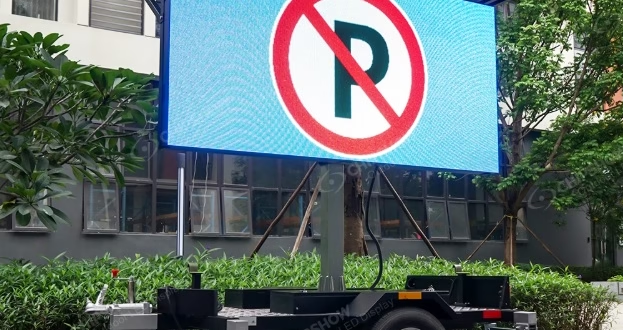
Variable message signs are the backbone of modern traffic management, delivering real-time information that keeps roads safe and traffic flowing. When these systems fail — even briefly — the consequences can range from driver confusion to serious safety hazards. Yet LED display errors in traffic sign service are far more common than many agencies acknowledge, and the technical teams responsible for maintaining them often face these challenges without adequate troubleshooting guidance.
From dead pixels and communication dropouts to power surges and firmware conflicts, the range of potential failures demands both technical knowledge and fast, decisive action. This article is designed specifically for Technical Support Teams working with variable message signs traffic systems. Drawing on LED Display Specs and FAQ Support resources, it provides a clear, practical framework for identifying the most frequent errors, understanding their root causes, and applying field-tested solutions. Whether you're managing a single roadside unit or an entire network of dynamic signs, the insights here will help you minimize downtime, maintain service accessibility, and keep traffic operations running safely and efficiently.
Understanding Variable Message Signs Traffic and LED Display Basics
Variable message signs serve as dynamic communication tools embedded within modern traffic infrastructure, displaying real-time alerts, speed limits, detour instructions, and hazard warnings to drivers. Unlike static signage, these systems respond to live conditions — weather events, accidents, congestion — making their reliability directly tied to public safety outcomes. A malfunctioning sign doesn't just inconvenience drivers; it can create dangerous confusion at critical decision points on highways and urban corridors.
At the core of every variable message sign is an LED display assembly comprising individual pixel modules, driver circuit boards, a power distribution unit, and a central controller. The controller receives data from traffic management software and translates it into visual output through the LED matrix. Communication between the control center and roadside units typically runs over cellular, fiber, or wireless networks, adding another layer of components that must function in harmony.
Proper maintenance is what keeps this chain intact. LED components degrade over time due to thermal stress, moisture ingress, and voltage fluctuations — all of which accelerate in outdoor environments. Without scheduled inspections, calibration checks, and firmware updates, minor issues compound into full display failures. Technical teams who understand the fundamental architecture of these systems are far better positioned to catch early warning signs and prevent costly, safety-critical outages before they occur.
Common LED Display Errors in Traffic Sign Service
Field technicians working with variable message signs encounter a recurring set of failures that, left unaddressed, escalate from minor annoyances into full service outages. Understanding these errors in context — not just as abstract technical faults but as real obstacles during live traffic management — is essential for any Technical Support Team responsible for keeping roadside displays operational.
Pixel and Display Malfunctions
Dead pixels, color shifts, and uneven brightness are among the most visible and immediately safety-relevant failures. Dead pixels typically result from LED burnout or failed driver ICs, while color shifts often indicate thermal degradation or component aging. Brightness inconsistencies across display zones reduce sign legibility at distance, directly compromising the driver's ability to read critical messages in time to respond safely.
Connectivity and Communication Failures
Network dropouts and data transmission errors prevent control centers from pushing updated messages to roadside units, leaving signs frozen on outdated information or going completely blank. These failures often stem from damaged communication cables, cellular signal interference, or misconfigured network protocols. For field teams, diagnosing connectivity issues remotely is particularly challenging when physical access to the unit requires road closures or specialized equipment.
Power and Software-Related Errors
Power surges from lightning strikes or grid instability can damage power supply units and corrupt onboard controllers. Firmware bugs introduce unpredictable display behavior — garbled text, incorrect character rendering, or unresponsive control interfaces. Configuration mistakes made during software updates or remote reprogramming sessions can override display parameters entirely, rendering signs inaccessible until settings are manually restored. Each of these errors directly hinders service accessibility and demands a structured response protocol.
Step-by-Step Solutions and Troubleshooting for Technical Teams
Fixing Pixel and Display Issues
Begin by running a full-screen diagnostic test pattern to isolate dead pixels and map brightness anomalies across display zones. Cross-reference the affected module's position against your LED Display Specs to confirm the correct replacement LED or driver IC part number before ordering. Once the faulty component is swapped, use calibration software to normalize luminance levels across the entire panel, ensuring uniform brightness that meets visibility standards for the sign's rated viewing distance.
Resolving Connectivity and Power Problems
Start with a physical cable inspection — look for corrosion, pinched conduit, or water ingress at junction boxes, which are the most common culprits behind persistent dropouts. Verify network protocol settings against the unit's communication spec sheet, then perform a controlled system reboot to clear transient faults. For power supply issues, measure input and output voltages at the distribution unit and compare against rated tolerances. FAQ Support documentation — such as the detailed voltage threshold tables published by manufacturers like Chipshow LED for their traffic-grade display modules — often saves significant diagnostic time in the field by providing model-specific reference values.
Addressing Software and Configuration Errors
Before applying any firmware update, back up the current configuration file to prevent data loss if the update fails or introduces new conflicts. Download the correct firmware version from the manufacturer's support portal, matching it precisely to the controller hardware revision listed in your LED Display Specs. After flashing, restore display parameters from the backup and run a full functional test. When behavior remains erratic post-update, consult the FAQ Support section for known firmware conflict resolutions — many recurring issues have documented patches or rollback procedures that restore normal operation without requiring hardware intervention.
Accessing LED Display Specs and FAQ Support for Maintenance
Knowing where to find accurate technical documentation is just as important as knowing how to use it. LED Display Specs for variable message signs typically include module wiring diagrams, pixel pitch tolerances, operating voltage ranges, controller compatibility charts, and environmental ratings — all of which are essential references during both scheduled maintenance and emergency repairs. Technical Support Teams should maintain local copies of these documents for every sign model in their network, organized by unit ID and installation location, so critical information is accessible even when internet connectivity is limited in the field.
Manufacturer support portals are the primary source for up-to-date specs and firmware documentation. Most portals organize resources by product line and hardware revision, so teams should record controller version numbers during initial installation to avoid pulling incompatible documentation later. Bookmarking model-specific pages and setting up notifications for document updates ensures your team is always working from current specifications rather than outdated revisions that may no longer reflect the hardware in service.
FAQ Support sections deserve more attention than they typically receive. Beyond basic setup questions, well-maintained FAQ libraries contain documented resolutions for recurring firmware conflicts, calibration drift issues, and communication errors reported by other field teams — effectively functioning as a collective troubleshooting database. Cross-referencing FAQ entries against active fault symptoms before escalating to manufacturer support can resolve issues in minutes rather than hours, significantly improving service accessibility across the entire sign network.
Best Practices in Field Operation and Service Accessibility
Consistent field operation standards are what separate reactive repair cycles from genuinely reliable sign networks. Establish a scheduled inspection routine that covers physical hardware checks, brightness calibration verification, and communication link testing at defined intervals — monthly at minimum for high-traffic corridor signs, quarterly for lower-priority units. Preventive maintenance catches thermal stress damage, moisture infiltration, and connector corrosion before they trigger full display failures during critical traffic events.
Service accessibility improves significantly when technical teams are trained not just on repair procedures but on reading diagnostic data from controller logs and remote monitoring dashboards. Allocate time for cross-training so multiple team members can handle each sign model in your network, eliminating single points of failure in your workforce. Keep a staged spare parts inventory — replacement LED modules, driver boards, and power supply units — organized by sign model to reduce response time when failures occur. Pairing strong field operation habits with well-organized documentation access ensures your team can resolve issues quickly, maintain sign uptime, and support safer traffic conditions across every route you manage.
Building Reliable Traffic Sign Networks Through Proactive Maintenance
Keeping variable message signs operational is not simply a technical obligation — it is a direct contribution to road safety and public trust in traffic infrastructure. Across the errors covered in this article, a clear pattern emerges: most failures, whether pixel malfunctions, connectivity dropouts, power supply damage, or firmware conflicts, are manageable when technical teams have the right knowledge and resources in place before problems occur.
LED Display Specs remain the foundation of effective maintenance, providing the component references, voltage tolerances, and compatibility data that make accurate diagnosis and repair possible. FAQ Support resources extend that foundation by capturing real-world resolutions from field experience, often cutting troubleshooting time dramatically when symptoms match documented cases. Together, these tools transform reactive repair work into structured, confident problem-solving.
For Technical Support Teams managing variable message signs traffic networks, the path forward is proactive rather than reactive. Regular inspections, organized documentation, cross-trained staff, and staged spare parts inventories collectively reduce both the frequency and duration of service disruptions. Every hour a sign operates correctly is an hour that drivers receive accurate, timely information — and that outcome is worth every investment in preparation, training, and technical rigor your team can bring to the work.