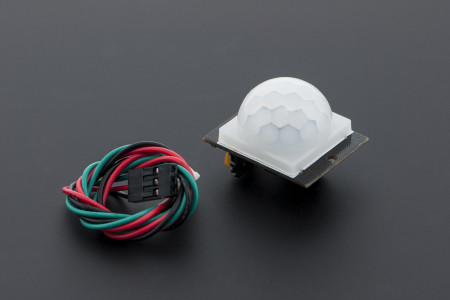
A PIR sensor is a normal first choice when you need to detect a person in a room. However, there is an important limitation: PIR sensors are much better at detecting movement than determining whether someone is simply present. This becomes a problem for applications such as room occupancy detection. A person working at a desk, watching television, or sleeping may remain relatively still for long periods.
The DFRobot C4001 takes a different approach. Instead of detecting infrared radiation from the human body, it uses a 24 GHz radar signal. The SEN0610 version of the C4001 can detect human presence as well as measure the distance and speed of a moving target. In this tutorial, I will connect the C4001 to an ESP32 and see how well it works as a human presence sensor. More importantly, I'll test whether it can continue detecting me when I'm sitting relatively still.
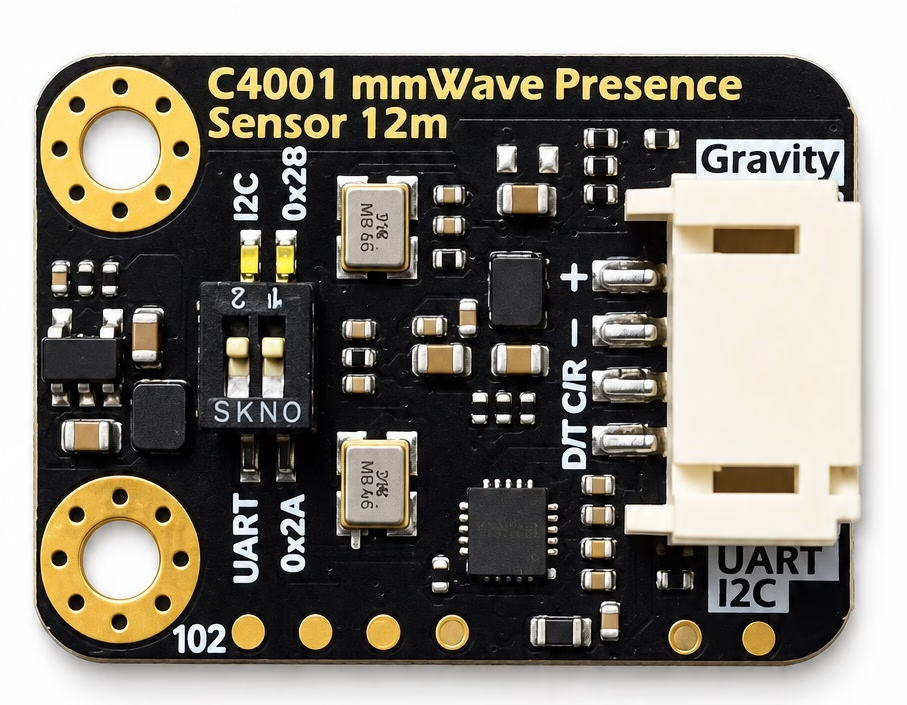
DFRobot C4001 SEN0610
The module I'm using is the DFRobot Gravity C4001 24 GHz mmWave Human Presence Detection Sensor, part number SEN0610. DFRobot offers different versions of the C4001, so this distinction matters. The SEN0610 used here is the 12-meter version.
Its main specifications are:
| Specification | Value |
|---|---|
| Operating frequency | 24 GHz |
| Radar technology | FMCW |
| Maximum detection range | 12 m |
| Beam angle | 100° × 80° |
| Supply voltage | 3.3 V / 5 V |
| Communication | I2C or UART |
| I2C address | 0x2A / 0x2B |
| UART baud rate | 9600 |
The board is quite small, measuring about 22 × 30 mm. My module also has a standard four-pin Gravity connector, so connecting it to another DFRobot board is straightforward. However, we can just as easily connect it to a regular ESP32 development board.
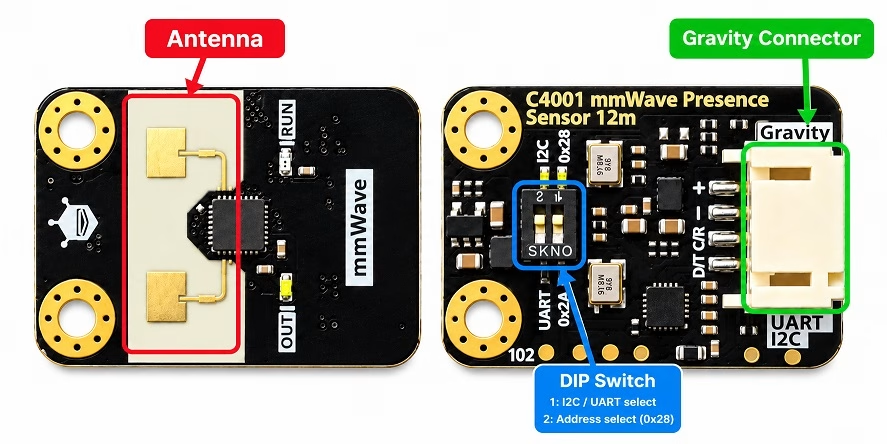
How mmWave Human Presence Detection Works
The C4001 is called a mmWave sensor because it uses radio waves with wavelengths measured in millimeters. In this case, the sensor operates around 24 GHz, which corresponds to a wavelength of roughly 12.5 mm.
Unlike a PIR sensor, the C4001 actively transmits a radio signal. When this signal encounters a person or another object, some of the radio energy reflects toward the sensor.
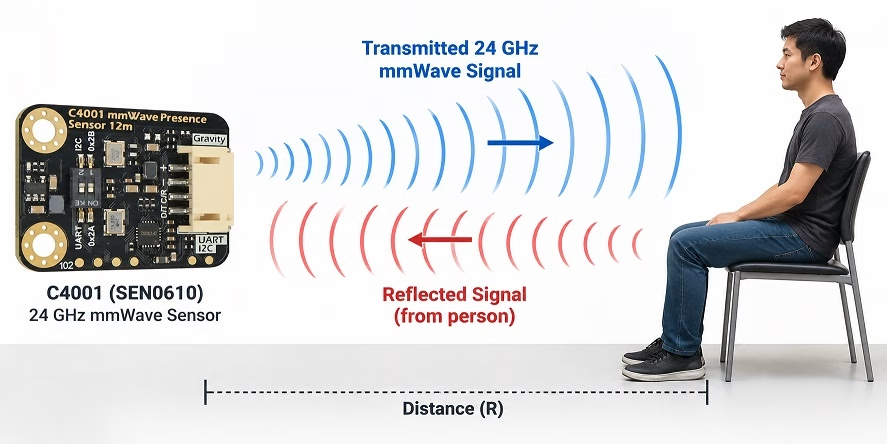
The sensor then compares the transmitted signal with the reflected signal. Changes in the returned signal can reveal information about the target. This is why a radar-based sensor can do more than simply produce a HIGH or LOW output when somebody moves. Depending on its operating mode, the C4001 can determine human presence, target distance, and target speed.
Why Can mmWave Detect a Person Sitting Still?
This is one of the most interesting differences between mmWave and PIR sensing. A PIR sensor detects changes in infrared radiation within its field of view. Someone walking across the room creates an obvious change, so a PIR sensor can detect that movement easily. However, if the person stops moving, the infrared pattern becomes relatively constant, and the PIR sensor may eventually stop reporting motion.
A person who appears stationary isn't actually perfectly motionless. Breathing moves the chest. We shift our posture slightly. Our head and hands make small movements even while we're sitting at a desk. A sufficiently sensitive radar sensor can detect these small changes in the reflected radio signal. This allows the C4001 to detect slight human movement and makes it useful for presence detection rather than only conventional motion detection.
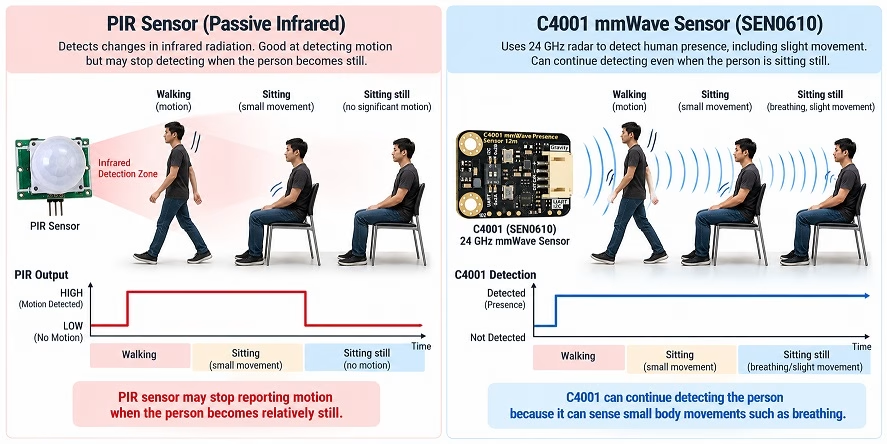
This is also something I'll test later rather than simply taking the manufacturer's specification at face value.
How the C4001 Measures Distance
The C4001 uses FMCW, or Frequency-Modulated Continuous-Wave radar. Instead of continuously transmitting the same frequency, an FMCW radar changes its transmitted frequency over a defined interval. This changing signal is commonly called a chirp.
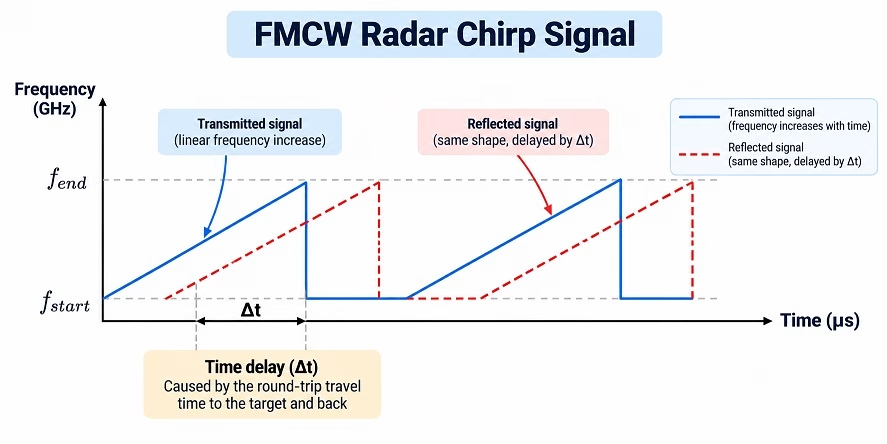
The reflected signal has traveled from the radar to the target and back again, so it arrives slightly later than the signal currently being transmitted. The radar compares the transmitted and received signals. Because the transmitted frequency is changing with time, the delay produces a difference between their frequencies. This difference is usually called the beat frequency. The farther away the target is, the longer the round trip takes and therefore the greater this frequency difference becomes.
In simplified form:

where:
- R is the distance to the target,
- c is the speed of light,
- fb is the measured beat frequency, and
- S is the frequency sweep rate of the radar chirp.
You don't need to perform this calculation on the ESP32. The C4001 handles the radar processing internally and makes the resulting target information available through its UART or I2C interface.
How the C4001 Measures Movement and Speed
Radar can also detect movement using the Doppler effect. If a person moves toward or away from the sensor, the reflected radio signal changes slightly because of that motion. The principle is similar to the familiar change in pitch of a vehicle siren as the vehicle approaches and then moves away, except here we're dealing with electromagnetic waves rather than sound.
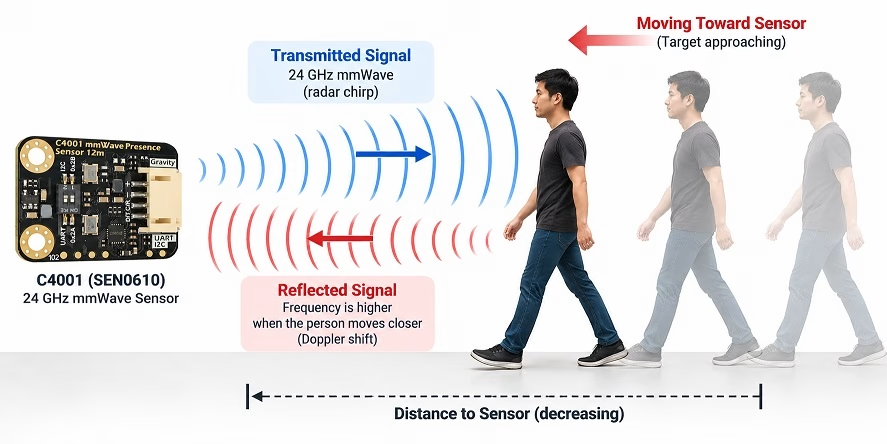
By analyzing these changes across its radar measurements, the C4001 can determine whether the target is moving and obtain information about its velocity. This gives us three useful pieces of information from one small module:
- Presence – Is somebody there?
- Range – How far away are they?
- Velocity – How fast are they moving toward or away from the sensor?
For an ESP32 project, most of the complicated radar processing therefore remains inside the C4001. From the ESP32 side, we're essentially communicating with a smart sensor and reading the processed results.
C4001 Pinout
Despite what is happening inside the sensor, connecting the module is surprisingly simple.
The Gravity connector has only four pins:
| Pin | I2C Function | UART Function |
|---|---|---|
| + | Power | Power |
| - | Ground | Ground |
| C/R | SCL | RX |
| D/T | SDA | TX |
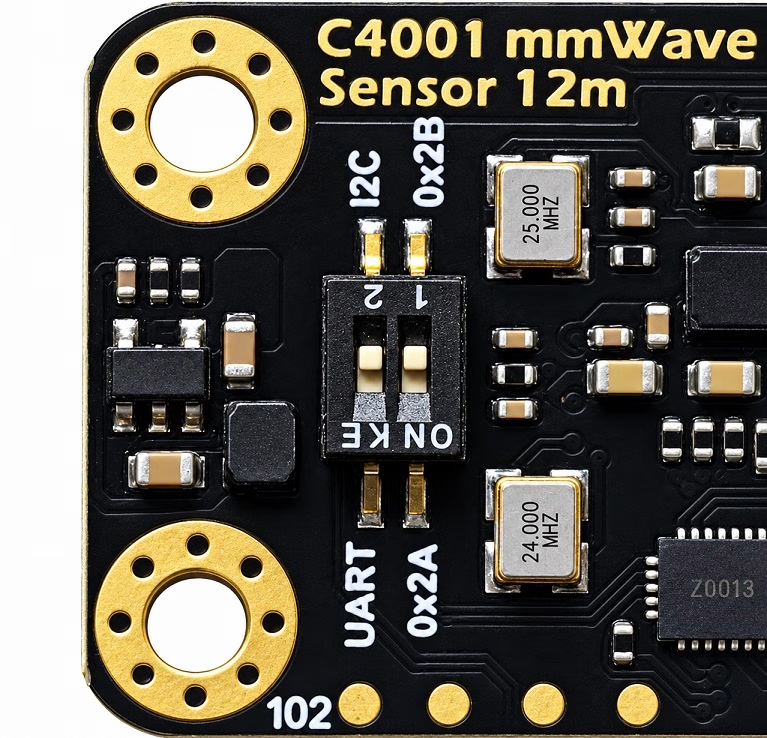
The same two signal pins therefore serve different functions depending on which communication interface is selected. Two DIP switches on the module configure the communication interface and I2C address.
For this tutorial, I will use I2C. This only requires two signal wires and lets the ESP32 communicate with the sensor using its normal I2C peripheral.
Connecting the C4001 to ESP32
For my test, I'll use the following connection:
| C4001 | ESP32 |
|---|---|
| + | 3.3 V |
| - | GND |
| C/R (SCL) | GPIO 22 |
| D/T (SDA) | GPIO 21 |
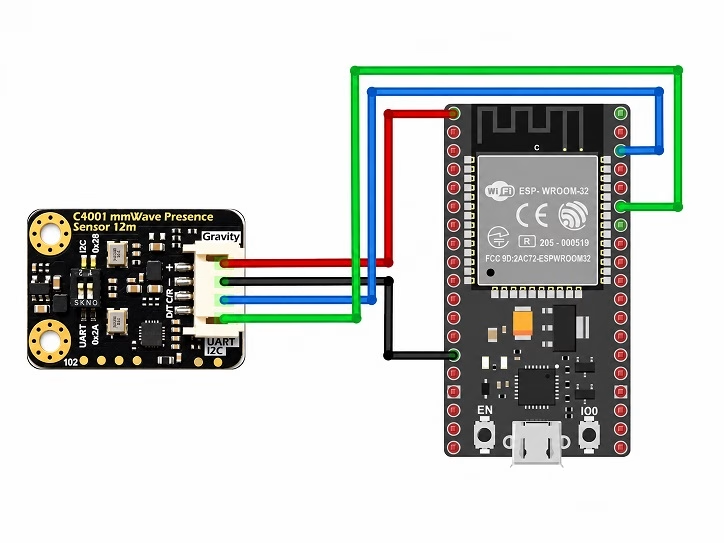
Before powering the circuit, the switches on the C4001 must also be placed in the appropriate I2C configuration. The C4001 supports two I2C addresses: 0x2A and 0x2B. The DFRobot Arduino library identifies these as DEVICE_ADDR_0 and DEVICE_ADDR_1.
Installing the DFRobot C4001 Arduino Library
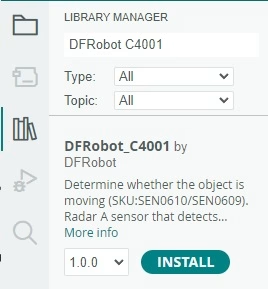
Fortunately, we don't need to implement the C4001 communication protocol ourselves. DFRobot provides the DFRobot_C4001 Arduino library.
Open the Arduino IDE Library Manager and search for DFRobot_C4001, then install the library. The library provides functions for presence and motion detection as well as obtaining target information such as range and speed.
Reading Distance and Speed with the ESP32
For our first test, we'll communicate with the sensor through I2C and print its readings to the Serial Monitor. The DFRobot library provides functions including:
radar.motionDetection();
radar.getTargetNumber();
radar.getTargetSpeed();
radar.getTargetRange();
radar.getTargetEnergy();
These functions allow the ESP32 to determine whether the sensor has detected a target and retrieve information about it.
#include <Wire.h>
#include "DFRobot_C4001.h"

#define SDA_PIN 21
#define SCL_PIN 22

// C4001 I2C address:
// DEVICE_ADDR_0 = 0x2A
// DEVICE_ADDR_1 = 0x2B
DFRobot_C4001_I2C radar(&Wire, DEVICE_ADDR_1);

void setup()
{
  Serial.begin(115200);

  // Initialize ESP32 I2C
  Wire.begin(SDA_PIN, SCL_PIN);

  // Connect to the C4001
  while (!radar.begin())
  {
    Serial.println("C4001 not detected.");
    delay(1000);
  }

  Serial.println("C4001 connected.");

  // Set the sensor to presence detection mode
  radar.setSensorMode(eExitMode);

  // Detection range: 30 cm to 10 m
  radar.setDetectionRange(30, 1000, 1000);

  // Sensitivity: 0 to 9
  radar.setTrigSensitivity(1);
  radar.setKeepSensitivity(2);

  // Trigger delay = 1 second (100 x 0.01 s)
  // Keep time = 2 seconds (4 x 0.5 s)
  radar.setDelay(100, 4);

  Serial.println("Presence detection started.");
}

void loop()
{
  if (radar.motionDetection())
  {
    Serial.println("Person detected");
  }
  else
  {
    Serial.println("No person detected");
  }

  delay(500);
}
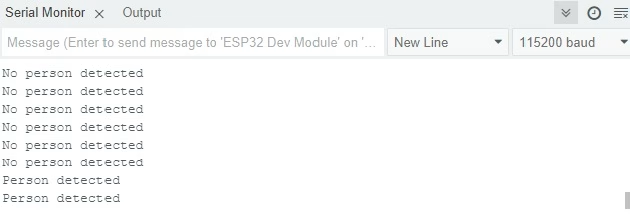
Once the code is running, we should be able to observe the C4001 readings directly from the Arduino Serial Monitor.
Can the C4001 Detect a Person Sitting Still?
This is the test I'm most interested in. Detecting someone walking across a room isn't particularly difficult. Even an inexpensive PIR sensor can do that. The more useful question is:
Can the C4001 tell that I'm still in the room when I'm barely moving?
To find out, I positioned the sensor approximately 1 meter away and performed three simple tests.
| Test | Result |
|---|---|
| Walking in front of sensor | detected |
| Sitting normally | detected |
| Sitting as still as possible | detected |
In all three tests, the sensor detected me almost instantly. Although there's a noticeable delay between detection and no detection when I am out of the sensor's range.
Testing the C4001 Detection Distance
DFRobot specifies a maximum detection range of 12 meters for the SEN0610. However, a maximum specification doesn't necessarily tell us what to expect inside an actual room. So I performed a simple real-world test. I placed the C4001 in a fixed position and moved away from it while monitoring its output.
| Actual Distance | Presence Detected? | C4001 Measured Distance |
|---|---|---|
| 1 m | Yes | 0.99 m |
| 3 m | Yes | 2.99 m |
| 5 m | Yes | 4.99 m |
| Maximum tested distance (10 m) | Yes | 10 m |
This isn't intended to be a laboratory characterization of the radar. Room geometry, sensor orientation, surrounding objects, and target movement can all affect radar measurements. Instead, the test gives us a better idea of what we can expect from the module in a normal indoor project.
Testing Target Speed
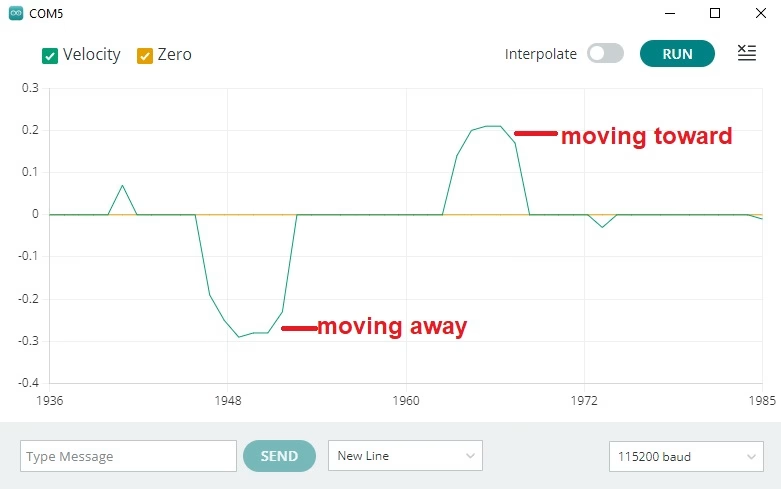
Since the C4001 can also report target velocity, I performed one more simple experiment. I walked toward the sensor and then away from it while watching the reported speed in the Serial Monitor.
| Movement | Reported Speed | Observation |
|---|---|---|
| Walking toward sensor | 0.2 | accurate |
| Walking away from sensor | -0.3 | accurate |
Presence Detection vs Distance and Speed Measurement
There is an important distinction when experimenting with the C4001. The sensor provides operating modes intended for different applications. One is particularly useful for determining whether somebody is present, while another provides target information such as distance and speed. This matters because an occupancy sensor and a radar measurement sensor aren't necessarily doing the same job.
If I were building an automatic room-lighting system, for example, my main question would simply be "Is somebody still in the room?" For another project, such as detecting someone approaching a doorway, distance and speed become much more useful.
In presence detection mode (eExitMode), the C4001 focuses on determining whether someone is within the configured detection area. Rather than continuously reporting how far away a person is, the sensor provides a detection status. This makes it suitable for applications such as automatic lighting, where the important thing is whether someone is still occupying the space.
Another useful feature of this mode is the ability to adjust the trigger sensitivity, keep sensitivity, and detection delay. These settings help prevent the output from changing too quickly when a person briefly stops moving. For example, if someone is sitting at a desk, an occupancy sensor should ideally continue reporting their presence even when they are relatively still.
Distance and speed measurement mode (eSpeedMode) works differently. Here, the C4001 can report the target's distance in meters and speed in meters per second. This is particularly useful when tracking someone walking toward or away from the sensor. With the ESP32 connected to the Arduino Serial Plotter, we can visualize the speed readings as the person moves.
One limitation is that the measured speed mainly represents movement along the radar's line of sight. Someone walking directly toward the sensor produces a more useful radial-speed measurement than someone walking sideways across its field of view. Also, distance and speed measurements are not the same as reliable room-occupancy detection. A stationary person may be easier to monitor using the dedicated presence detection mode.
For practical applications, I would choose presence detection mode for occupancy-based automation and distance and speed measurement mode for projects that need information about a moving target. The distinction is worth remembering because switching modes changes not only the available measurements but also the configuration functions used in the Arduino sketch.
C4001 mmWave vs PIR Sensor
The C4001 isn't necessarily a replacement for every PIR sensor. PIR sensors remain extremely simple and inexpensive. For detecting obvious movement, such as somebody walking past a doorway, they can be perfectly adequate. The C4001 becomes more interesting when the application needs to know whether somebody remains present.
| Feature | C4001 mmWave | PIR |
|---|---|---|
| Detect obvious movement | Yes | Yes |
| Detect slight human movement | Yes | Limited |
| Presence detection | Yes | Primarily motion-based |
| Target distance | Available | No |
| Target velocity | Available | No |
| Active transmitter | Yes | No |
| Microcontroller interface | I2C / UART | Usually digital output |
| Implementation complexity | Higher | Very low |
That makes mmWave especially attractive for occupancy-based automation where turning the lights off simply because someone hasn't moved enough for a PIR sensor is undesirable.
Where Can You Use the C4001?
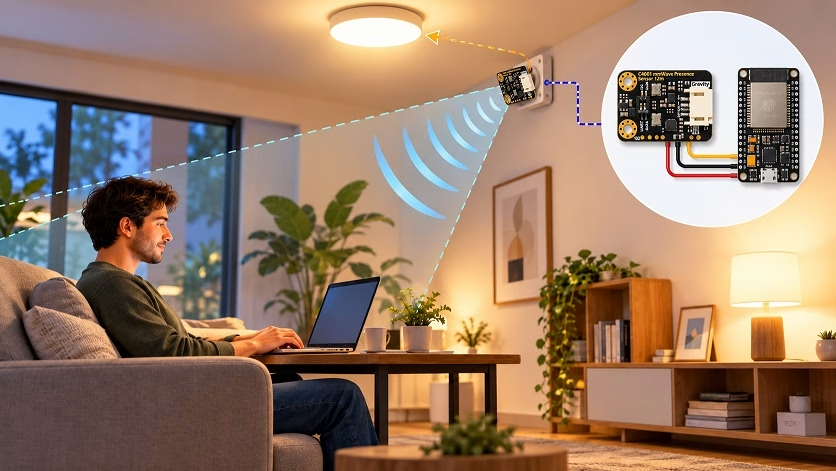
The most obvious use for the C4001 is room occupancy detection. An ESP32 could use the C4001 to determine whether a room remains occupied and then control lights, ventilation, air conditioning, or other devices accordingly.
Other possible applications include:
- Smart lighting systems
- Home automation
- Office occupancy detection
- Automatic HVAC control
- Bathroom occupancy sensors
- Security systems
- Bedside presence detection
- Automatic doors
- Approach detection
The distance information also opens up more interesting possibilities. Instead of simply detecting someone, an ESP32 could respond differently depending on how close that person is to a device.
Final Thoughts
At first glance, the DFRobot C4001 performs the same basic job as countless inexpensive motion sensors: detecting whether somebody is nearby. The important difference is how it does it. Using 24 GHz radar allows the C4001 to detect subtle movement that would be difficult for a conventional PIR sensor to recognize. At the same time, FMCW radar allows the module to provide information such as target distance and velocity. And from the ESP32 side, using all of this is surprisingly straightforward. The complicated radar processing happens inside the C4001; our microcontroller simply retrieves the processed information through I2C or UART.
During testing, one of the more interesting things to examine with the C4001 is how it responds when a person stops moving. Unlike a conventional PIR sensor, which primarily responds to changes in infrared radiation, the C4001 uses radar to detect movement, including smaller movements associated with someone remaining in place. However, detecting a person who is sitting quietly is still more challenging than detecting someone walking directly toward the sensor. The result depends on the sensor's sensitivity settings, mounting position, and surrounding environment.
The distance and speed measurement mode also adds another dimension to the experiment. Instead of simply indicating that a target has been detected, the sensor can provide measurements that we can observe through the Arduino Serial Monitor or Serial Plotter. Walking toward and away from the sensor is a useful way to demonstrate these capabilities, although the readings can fluctuate because of body movement, changes in target reflection, and the angle at which the person approaches.
Another consideration is the detection environment. Walls, furniture, and other reflective objects can affect radar measurements, while movements outside the intended detection area may produce unwanted detections. For this reason, sensitivity and detection-range adjustments are important, particularly when using the C4001 in a small room or near a doorway.
Overall, the C4001 offers more flexibility than a basic motion detector. Its presence detection mode is useful for occupancy-based applications, while its distance and speed measurement mode opens up possibilities for movement monitoring and interactive projects. The ESP32 handles both modes using relatively simple Arduino code, leaving the more complicated signal processing to the radar module.
For projects where you only need to detect somebody walking past a sensor, a PIR sensor may still be the simpler and cheaper solution. However, when the question changes from "Did something move?" to "Is somebody still here?", a mmWave presence sensor such as the C4001 becomes much more interesting.