A roofer pays for Google Ads and Facebook ads every month. Both report conversions, but the numbers do not match each other, and neither matches the jobs on the calendar. Usually one platform counts page views, another counts every button click, and nobody counts phone calls.
Here is how to decide what counts, set it up in Google Ads, GA4 and the Meta pixel, and test it in 30 minutes.
Key takeaways
- Count only actions that can become a job: a form sent, a call from the site, a booking, a chat. Never a page view.
- In Google Ads, set lead actions to Count: One and keep one Primary action per lead.
- Google Ads can import only GA4 events marked as key events.
- On the Meta pixel, use Lead for forms, Schedule for bookings and Contact for calls and chats.
- Booked jobs can go back to Google Ads up to 90 days after the click.
What should a local business count as a conversion?
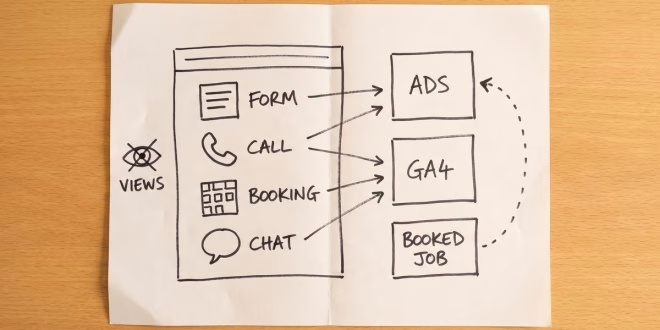
A conversion is an action that can turn into paid work. For a local business that means four things: a form sent, a call placed from the website, a booking made and a chat started. Page views, button clicks and time on site are not conversions. They show interest, not a lead.
| Conversion | How to track it | Tool |
|---|---|---|
| Form sent | Thank you page view or form submit event | GA4 key event, Meta Lead |
| Call from the website | Google forwarding number, minimum call length | Google Ads calls from website |
| Booking | Confirmation page, cross domain if the tool is on another site | GA4 key event, Meta Schedule |
| Chat started | Chat start event from the widget | GA4 key event, Meta Contact |
| Booked job | Upload with the click ID | Google Ads offline conversions |
How to set up Google Ads conversion tracking
Google Ads Help gives two data sources for website conversions: the Google tag, or importing key events from Google Analytics. Imports can take 24 to 48 hours to appear. Then check four settings on each action:
- Primary or Secondary. Primary actions fill the Conversions column and drive bidding. Secondary ones only show in All conversions. If the tag and GA4 both track one form, make only one primary.
- Count: One. Google recommends One for leads and Every for sales.
- Conversion window. The default is 30 days, with a range of 1 to 90. Make it longer if people call back weeks after a click, as with roofs or legal cases.
- Calls from website. A phone snippet swaps your number for a Google forwarding number, only for visitors who clicked an ad. A call counts when it passes the minimum length you set. Set it just under your shortest real booking call.
GA4 key events, the Meta pixel and booking tools
In GA4, go to Admin, then Events under Data display, and click the star next to the event. For forms, a thank you page is the most reliable signal. Create an event with Create without code, base it on page_view and enter the thank you page address. A form submit event can fire on errors or double clicks.
On the Meta pixel, Meta's pixel reference describes Schedule as booking an appointment and Contact as reaching you by phone, SMS, email or chat. Use Lead for a sent form, one event per action.
If your booking tool runs on its own domain, set up cross domain measurement in GA4 under Data streams, Configure tag settings, Configure your domains. Google Analytics Help says both sites need the same tag ID. If the tool will not take your tag, count its confirmation emails by hand.
The step after: send booked jobs back
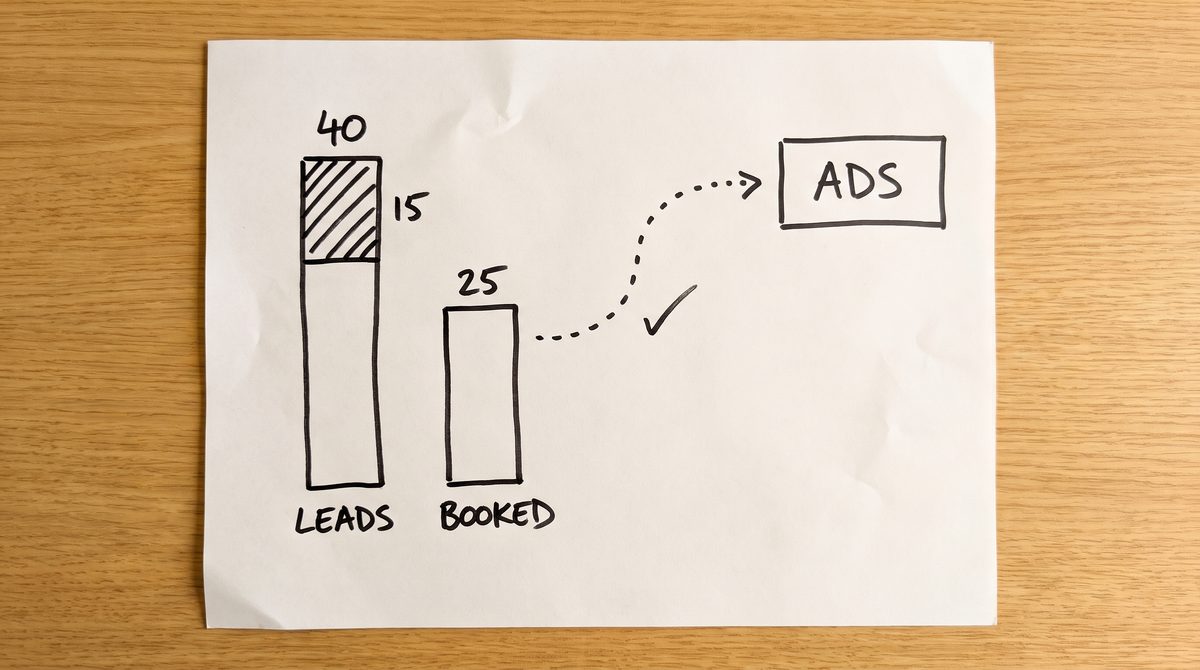
A lead is not a job. Say a salon gets 40 form leads in a month and 25 of them book. Google Ads sees 40 equal leads, so it bids just as hard for the 15 that went nowhere. Sending booked jobs back fixes that.
The simple version is a spreadsheet and a weekly upload. When jobs close across a CRM, a booking tool and the phone, a marketing attribution platform such as the one at observix.ai connects the ad accounts, website and CRM and sends verified conversions back to the ad platforms.
For the spreadsheet route, Google Ads Help on offline conversions says to save the click ID, the gclid, with each lead. Add a hidden gclid field to your form so it lands in your job list next to the name and phone. Auto tagging must be on, and you should wait 4 to 6 hours after creating the import action before the first upload. Jobs uploaded more than 90 days after the click are not accepted, so upload weekly.
How to test your tracking in 30 minutes
1. Connect Tag Assistant (5 minutes)
Go to tagassistant.google.com, click Add domain, enter your site and click Connect. Your site opens in a debug window, and Tag Assistant lists each tag as you click around.
2. Send a test form (5 minutes)
Fill in your own form with the name Test Lead. The conversion tag should fire once on the thank you page. If it fires twice, you are double counting.
3. Check the phone snippet (5 minutes)
You will see your normal number, because you did not come from an ad. Check instead that the snippet is on every page that shows your number, including the footer and the contact page.
4. Open Meta Test events (10 minutes)
Meta's developer docs place the tool at Events Manager, Data Sources, your pixel, Test Events. Open your site from there, send the form again, and check that a Lead event appears, not only PageView.
5. Clean up (5 minutes)
Delete every Test Lead from your job list, so it never gets uploaded as a booked job.
Common questions
Should page views count as conversions in Google Ads?
No. A page view is interest, not a lead. If it is primary, bidding will chase cheap visits, so set it to secondary or remove it.
Should I use the Google tag or import GA4 key events?
If GA4 already tracks your forms well, import them. Use the Google tag if you do not use GA4. Never make both primary for the same form.
What Meta pixel event should I use for a lead form?
Lead. Use Schedule for a booked appointment and Contact for a tap on your phone number or chat button.
Why do Google Ads and GA4 show different conversion numbers?
Google Ads counts only conversions that follow an ad interaction inside the window. GA4 counts visitors from every channel. Some gap is normal.
Pick one lead form today, make it the only primary action with Count: One, and run the 30 minute test. Once that number matches your inbox for two weeks, add calls, then bookings.