This article was originally sponsored by Cloom.
An AV cable, short for audio/video cable, is used to carry audio, video, or both between electronic devices. AV cables have been widely used with televisions, DVD players, game consoles, cameras, projectors, amplifiers, and other home entertainment equipment.
When most people refer to an AV cable, they are usually talking about the familiar cable with yellow, red, and white RCA connectors. However, AV is a broad term, and several different connector types can carry audio and video signals.
In this guide, we will look at what an AV cable is, what the different connector colors mean, the common types of AV cables, and how AV cables differ from newer connections such as HDMI.
What Is an AV Cable?
An AV cable connects an audio or video source to another device. The source might be a DVD player, game console, camera, or set-top box, while the receiving device is commonly a television, monitor, projector, or amplifier. The term AV does not describe one specific connector. Instead, it refers to cables used for transmitting audio and/or video signals.
Common examples include:
- Composite RCA cables
- Component video cables
- S-Video cables
- Coaxial cables
- VGA and DVI cables
- HDMI cables
- 3.5 mm AV cables
Some of these standards carry analog signals, while newer standards such as HDMI transmit digital audio and video.
What Do the Yellow, Red, and White AV Cables Mean?
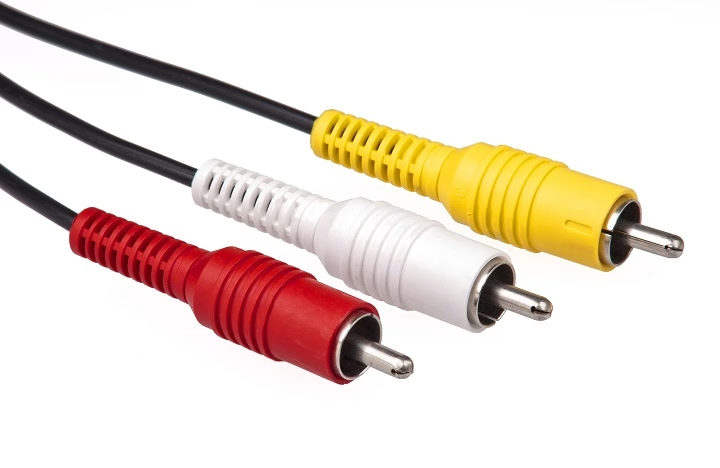
The classic AV cable normally has three RCA connectors:
- Yellow – Video
- White – Left audio channel
- Red – Right audio channel
The yellow connector carries a composite video signal. The video information is combined into a single analog signal and transmitted through one cable. The red and white connectors carry stereo audio. White is normally used for the left audio channel and red for the right audio channel. If a device only supports mono audio, it may use just one audio connector together with the yellow video connector.
AV Cable vs. RCA Cable
The terms AV cable and RCA cable are often used interchangeably, especially when referring to the yellow, red, and white cable found on older televisions and media devices. Technically, however, RCA refers to the connector type. RCA connectors can be used for several purposes, including:
- Composite video
- Component video
- Analog stereo audio
- Digital coaxial audio
An AV cable describes the cable's purpose, while RCA describes one common connector used to accomplish that purpose.
What Is an AV Port?
An AV port is the connector or group of connectors on a device where an AV cable is plugged in. On older televisions, the AV input is often a group of three RCA sockets colored yellow, white, and red. These may be labeled:
- AV IN
- VIDEO IN
- AUDIO IN
- COMPOSITE
DVD players, game consoles, set-top boxes, and other source devices may instead have connectors labeled AV OUT. The distinction is important:
- AV OUT sends audio and video from a device.
- AV IN receives audio and video.
Connecting two output ports or two input ports will not normally work.
What Is an AV Connector?
An AV connector is the physical plug or socket used to transmit audio or video signals. RCA is one of the best-known AV connectors, but there are many others. HDMI, VGA, DVI, S-Video, and some 3.5 mm connectors can all be considered AV connectors when they are used to carry audio or video. The correct connector depends on the equipment you are trying to connect and the type of signal supported by each device.
AV Cable Types and Their Applications
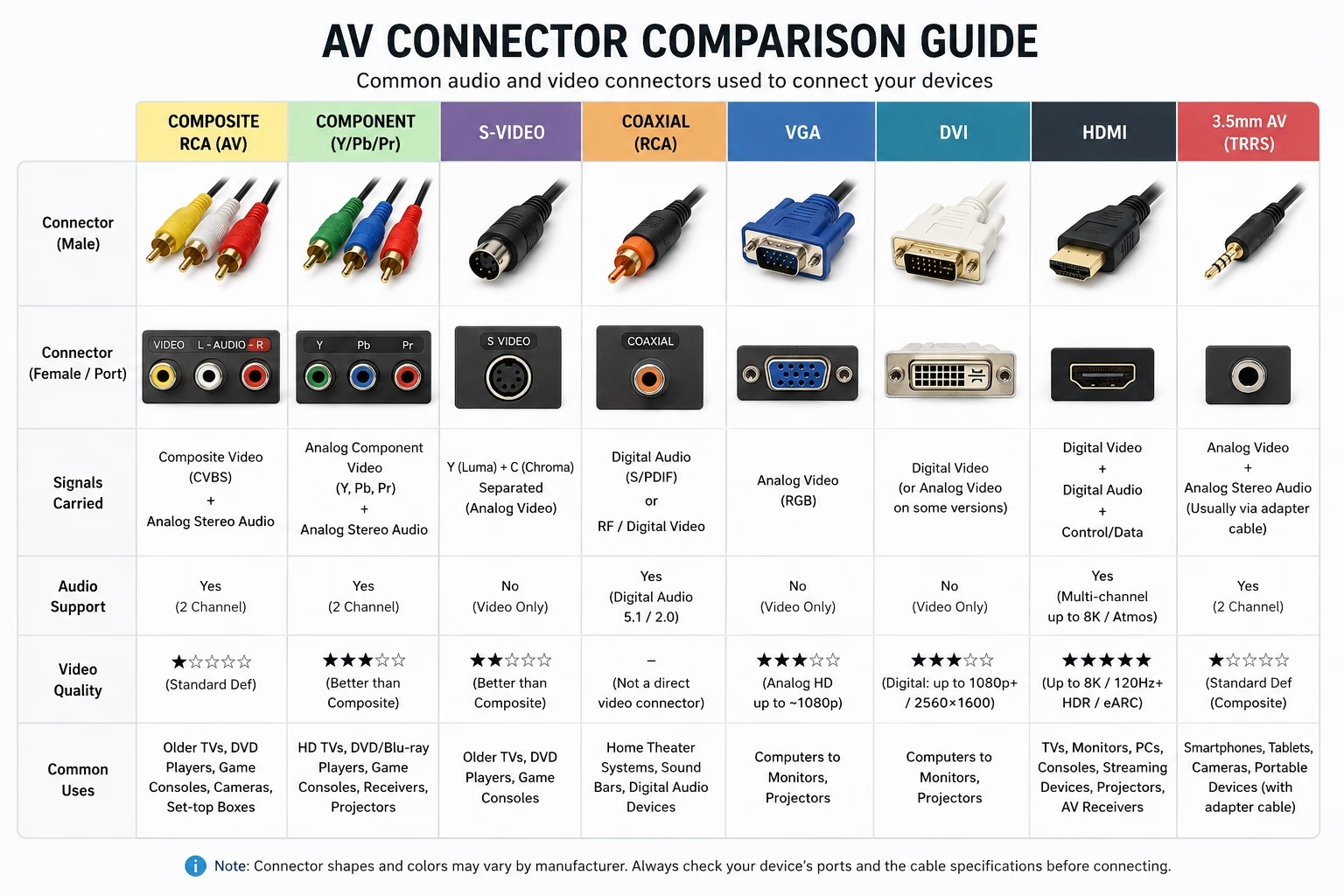
Composite AV Cable
A composite AV cable is the classic yellow, red, and white cable. The yellow connector carries analog video, while red and white carry stereo audio. Composite video was widely used with:
- Older televisions
- DVD and VCD players
- Game consoles
- Camcorders
- Set-top boxes
Composite video combines the video information into one signal. This makes the connection simple, but image quality is considerably lower than that of modern digital interfaces.
Component Video Cable
Component video also commonly uses RCA-style connectors, but instead of one video cable, the video signal is divided among three connectors. These are commonly colored:
- Green – Y
- Blue – Pb/Cb
- Red – Pr/Cr
Separate red and white RCA connectors may then be used for stereo audio. Component video can provide better picture quality than composite video because the video information is separated instead of being combined into one signal.
S-Video Cable
S-Video is another analog video standard. It separates brightness and color information instead of combining everything into one composite signal. This generally provides a cleaner image than composite video. S-Video carries video only, so separate cables are normally required for audio.
Coaxial AV Cable
Coaxial cables consist of a center conductor surrounded by insulation and shielding. They are designed to reduce interference and can be used for television, video, and digital audio applications. Coaxial connections remain common in cable television, antennas, satellite equipment, and RF systems.
VGA Cable
VGA was widely used for connecting computers to monitors and projectors. VGA carries an analog video signal but does not normally carry audio. If audio is required, a separate cable must be used.
DVI Cable
DVI was developed as a video interface for computers and displays. Depending on the type of DVI connector, it can support digital video, analog video, or both. Like VGA, DVI is primarily a video interface rather than an audio/video connection.
HDMI Cable
HDMI has largely replaced older AV connections in modern televisions, monitors, game consoles, computers, and streaming devices. Unlike composite AV cables, HDMI can carry digital video and digital audio through a single cable. This reduces the number of cables needed and supports much higher video quality than traditional composite AV connections.
AV Cable vs. HDMI
Traditional composite AV and HDMI both connect audio/video equipment, but they operate very differently.
| Feature | Composite AV | HDMI |
|---|---|---|
| Signal type | Analog | Digital |
| Typical connectors | Yellow, red, white RCA | Single HDMI connector |
| Video and audio | Separate connectors | Single cable |
| Common equipment | Older TVs, DVD players, consoles | Modern TVs, PCs, consoles, streaming devices |
| Image quality | Standard definition | Supports HD and higher resolutions |
If both devices have HDMI ports, HDMI is normally the better choice. Composite AV remains useful when connecting older equipment that does not support HDMI.
Can You Convert AV to HDMI?
Yes, but converting traditional composite AV to HDMI normally requires an active AV-to-HDMI converter. This is because composite AV carries an analog signal while HDMI carries digital information. The converter must electronically process the incoming signal and convert it into a format that an HDMI display can understand. A typical connection looks like this:
Older device → Yellow/Red/White AV cable → AV-to-HDMI converter → HDMI cable → Modern TV
This is useful for connecting older DVD players, cameras, game consoles, and other legacy equipment to modern televisions that no longer include composite AV inputs.
Can You Convert HDMI to AV?
Conversion in the opposite direction is also possible using an HDMI-to-AV converter. This type of device accepts a digital HDMI signal and produces analog composite video and stereo audio. An HDMI-to-AV converter can be useful when connecting a newer HDMI source to an older television or display. It is important to pay attention to the direction of the converter. An AV-to-HDMI converter and an HDMI-to-AV converter are not the same device.
AV Cable, AV Wire, and AV Cord: Is There a Difference?
The terms AV cable, AV wire, and AV cord are often used to describe the same thing in everyday use. Cable is generally the most accurate term because an AV cable normally contains one or more conductors together with insulation, shielding, and connectors. However, someone asking for an AV wire or AV cord will often be referring to the same cable used to connect audio/video equipment.
How to Connect an AV Cable to a TV
For a standard composite AV connection:
- Locate the AV input connectors on the television.
- Connect the yellow plug to the yellow video input.
- Connect the white plug to the white or left audio input.
- Connect the red plug to the red or right audio input.
- Connect the other end of the cable to the AV output of the source device.
- Turn on both devices.
- Select the appropriate AV or composite input using the television's input/source menu.
If the colors do not match or your television uses a combined AV input, consult the television's documentation before connecting the cable.
Common AV Cable Problems
No Picture
Check that the yellow video connector is inserted into the video input rather than one of the audio connectors. Also verify that the television is set to the correct AV input.
Picture but No Sound
Check the red and white audio connectors. Both may be required for stereo audio.
Black-and-White or Distorted Picture
Make sure the cable is connected to the correct type of input. Composite and component connections both commonly use RCA connectors, but their signals are not interchangeable simply because the connectors physically fit.
Loose or Intermittent Connection
RCA connectors rely on physical contact between the plug and socket. A loose, damaged, dirty, or oxidized connector may cause intermittent audio or video.
New TV Has No AV Port
Many newer televisions have reduced the number of analog inputs or removed them entirely. In this situation, an AV-to-HDMI converter may be required.
Frequently Asked Questions
What does AV stand for?
AV stands for audio/video.
What is an AV cable used for?
An AV cable is used to carry audio, video, or both between electronic devices such as televisions, DVD players, cameras, game consoles, projectors, and receivers.
What color is the video cable?
On a standard composite RCA AV cable, yellow carries video. Red and white carry the right and left audio channels.
Is an AV cable the same as an RCA cable?
The terms are commonly used interchangeably when referring to yellow, red, and white composite cables. RCA technically refers to the connector type, while AV describes the cable's audio/video purpose.
Does an AV cable carry HD video?
Standard yellow composite AV connections are intended for standard-definition analog video. For high-definition digital video, HDMI is generally used instead.
Can I plug an AV cable into a modern TV?
If the television has composite AV inputs, yes. If the TV only has HDMI inputs, an AV-to-HDMI converter may be necessary.
Why does my AV cable have only one connector?
Some devices use a single 3.5 mm connector that carries several audio and video signals. A breakout cable then converts that connector into separate RCA plugs. The wiring of these connectors can vary between manufacturers, so compatibility should be checked before purchasing a replacement cable.
Choosing the Right AV Cable
The correct AV cable depends primarily on the connectors available on your source and display devices. If both devices support HDMI, HDMI is normally the simplest option. However, older televisions, cameras, game consoles, DVD players, and other equipment may still require composite, component, S-Video, VGA, DVI, or another legacy connection.
Before buying a cable or adapter, check:
- The output connector on the source device
- The input connector on the display or receiver
- Whether the signal is analog or digital
- Whether audio must be carried separately
- Whether an active signal converter is required
A connector that physically fits does not necessarily mean the two devices use compatible signals.
About Cloom
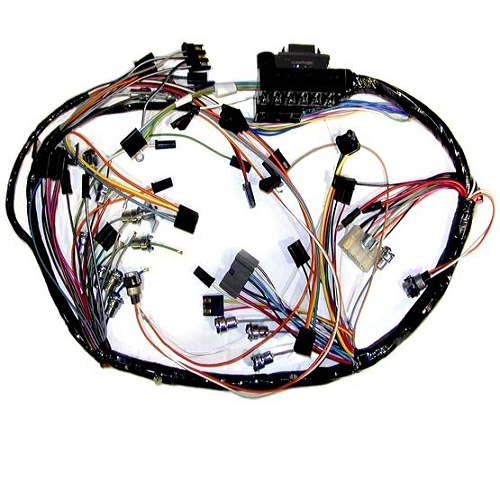
This article was originally published as a sponsored post for Cloom, a manufacturer of wire harnesses and cable assemblies. The company provides electronic wiring harnesses, power cables, signal wiring harnesses, automotive wiring harnesses, custom design, assembly, and related cable manufacturing services.
The original sponsored material also referenced Cloom's resources covering printer cables and VGA-to-HDMI connections.
Conclusion
AV cable is a broad term covering cables used to transfer audio and video between electronic devices. The most recognizable example is the yellow, red, and white composite RCA cable, but S-Video, component video, VGA, DVI, HDMI, and other connection standards also fall within the wider world of audio/video connectivity.
For older equipment, traditional AV connections remain useful. When connecting legacy devices to newer televisions and monitors, converters such as AV-to-HDMI or HDMI-to-AV can bridge the gap between analog and digital equipment.