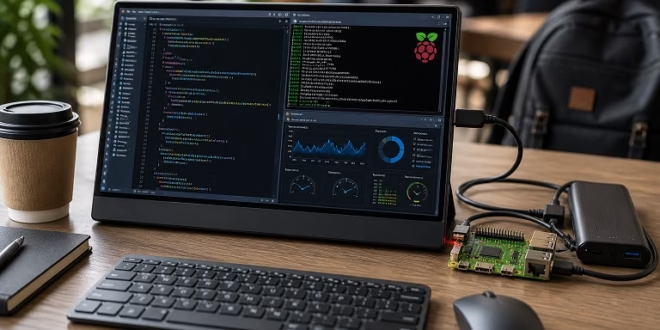
In the realm of DIY electronics and compact computing, the Raspberry Pi stands as a titan. Since its inception, this credit-card-sized computer has evolved from a simple educational tool into a powerhouse capable of driving complex artificial intelligence, high-definition media centers, and professional-grade server environments. However, the true mobility of the Raspberry Pi is often hampered by the requirement of a stationary setup. To transform this versatile board into a truly functional mobile device, the integration of a high-quality portable monitor is not just an upgrade—it is a necessity.
By pairing the Raspberry Pi with modern display technology, users can unlock a level of productivity and creativity that was previously reserved for high-end laptops. This article explores the most compelling use cases for this combination, providing a roadmap for geeks, engineers, and hobbyists to maximize their hardware.
The Portable Coding and Development Station
For developers, consistency in the environment is the key to efficiency. Whether you are a student learning Python or a senior engineer managing microservices, the Raspberry Pi provides a native Linux environment that is perfect for coding. However, coding on a small 7-inch screen can be cramped, and lugging around a 24-inch office screen is impossible.
A 15.6-inch or 13.3-inch monitor offers the perfect middle ground. It provides enough screen real estate to run a code editor like VS Code alongside a terminal and a web browser for documentation. With the Raspberry Pi 4 or 5, you have enough RAM and CPU power to handle modern web development, and the portable screen ensures you can take that workflow to a coffee shop, a flight, or a remote co-working space.
Furthermore, the ability to power many of these monitors via a single USB-C cable (depending on the Pi's power output or an external power bank) makes the setup incredibly streamlined, reducing the "cable spaghetti" that often plagues DIY projects.
All-in-One “Cyberdeck” and Integrated Builds
For many enthusiasts, the beauty of the Raspberry Pi lies in the "build." There is a growing trend of creating "Cyberdecks"—customized, portable computers that often look like they stepped out of a science fiction novel. The challenge in these builds is usually the mounting of the screen and the cable management between the display and the Pi.
This is where a specialized raspberry pi display becomes invaluable. Unlike standard screens, these are often designed with the Pi in mind, featuring built-in mounting points on the back of the monitor. This allows the Pi to be tucked away, creating an integrated, tablet-like form factor. This setup is ideal for:
- Field Research: Taking your Pi into the field to collect data or monitor sensors.
- On-Site Troubleshooting: Connecting to industrial machinery via the Pi's GPIO pins while having a clear, high-resolution interface to view logs.
- Hobbyist Workshops: Having a dedicated screen at your workbench for following tutorials or schematics without taking up valuable desk space.
The Ultimate Retro Gaming Experience
The Raspberry Pi is arguably the most popular platform for retro gaming, thanks to projects like RetroPie, Recalbox, and Batocera. While playing classic titles on a 65-inch 4K TV is impressive, it often highlights the limitations of low-resolution sprites. Moreover, the "big screen" setup isn't portable.
Using a portable screen transforms your Pi into a high-end handheld console. Because many portable monitors use IPS panels, they offer vibrant colors and wide viewing angles, which are essential for capturing the aesthetic of classic arcade and console games. Whether you are sitting in a hotel room or a friend's house, you can deploy a full gaming setup in seconds. The low input lag associated with high-quality portable displays ensures that frame-perfect jumps in Super Mario or combos in Street Fighter are executed flawlessly.
Cybersecurity, Pentesting, and Network Auditing
In the world of cybersecurity, portability is a tactical advantage. Security professionals often use Raspberry Pis running Kali Linux or Parrot OS to perform network audits and penetration testing. These tasks require a screen that is large enough to read multiple terminal outputs simultaneously but discrete enough to be used in various environments.
A portable display allows the "red team" operative to see real-time data from Wireshark, Metasploit, or Aircrack-ng without needing to SSH from a separate laptop, which might not always be feasible in a secure or air-gapped environment. The lightweight nature of these monitors means they can be slipped into a backpack alongside the Pi and a small wireless keyboard, creating a complete "hacker's kit" that weighs less than a standard laptop.
Smart Home Command Centers and Dashboards
As the Internet of Things (IoT) grows, more users are turning to the Raspberry Pi to host Home Assistant or OpenHAB. These platforms aggregate data from smart lights, thermostats, security cameras, and solar panels. While these systems are usually accessed via a smartphone, a dedicated physical dashboard adds a layer of convenience and "cool factor" to a smart home.
A portable monitor with touch-screen capabilities is the ideal candidate for this. It can be mounted on a kitchen wall or placed on a hallway table to act as a central hub. Family members can check the weather, view camera feeds, or toggle lights with a single tap, all powered by the reliable, low-energy Raspberry Pi hidden behind the screen.
Technical Considerations for the Perfect Setup
When selecting your hardware, it is important to understand the technical synergy between the display and the Pi.
Power Management
The Raspberry Pi 4 and 5 require significant current, typically $5V / 3A$ or $5V / 5A$ for peak performance. When connecting a monitor, you must ensure that your power supply can handle both the Pi and the display if you are daisy-chaining power. Many UPERFECT monitors support "Power Delivery," allowing you to power the monitor, which then passes power to the Pi, or vice versa, simplifying your setup significantly.
Resolution and Scaling
The Raspberry Pi OS handles $1920 \times 1080$ resolution perfectly out of the box. While 4K is possible on newer Pi models, the UI scaling on a 15-inch screen can make text very small. For most users, a 1080p portable screen provides the best balance of clarity and system performance, ensuring the Pi's GPU isn't overworked.
Connectivity
Ensure your cables are suited for the job. The Pi 4 and 5 use Micro-HDMI ports, so a Micro-HDMI to Mini-HDMI or Full-HDMI cable is necessary to connect to most portable screens. If you are using a raspberry pi display with touch functionality, you will also need a USB cable connected from the Pi to the monitor's "Touch" port to enable gesture controls.
Conclusion: A Match Made in Tech Heaven
The Raspberry Pi is a canvas, and the portable monitor is the window through which we view its art. Whether you are building a portable server, a retro gaming rig, or an industrial controller, the synergy between these two devices is undeniable. By breaking free from the desktop, you allow the Raspberry Pi to fulfill its true purpose: being a computer that can go anywhere and do anything.
Investing in a high-quality display is an investment in the versatility of your projects. Don't let a bulky, low-resolution screen be the bottleneck of your creativity. Elevate your Pi projects today with a display solution that matches the innovation of the board itself.