Was that an earthquake, or did I just stand up too fast? If you’ve ever asked that question — then this project’s for you.
We’re building an ESP32 Earthquake Monitor that fetches live data from the USGS Earthquake API, locates your position via NEO-6M GPS, and alerts you through an LCD, buzzer, and RGB LED. It even logs quake data to an SD card and hosts a mini web dashboard for quake history — because if you’re going to feel the earth move, you might as well have the data to prove it.
Project Overview
This project combines IoT, geolocation, and real-time data processing in one neat ESP32 package.
Here’s what happens behind the scenes:
- The ESP32 connects to Wi-Fi and syncs its clock with an NTP (Network Time Protocol) server.
- Using the current date, it requests the day’s earthquakes in a given location via the USGS Earthquake API.
- The NEO-6M GPS module provides your current coordinates.
- The ESP32 computes which earthquakes are closest to you.
- If a quake is detected within ~200 km:
- All quake data is logged to the SD card, and you can view it later through the ESP32’s built-in web page.
Components Needed
| Component | Description |
|---|---|
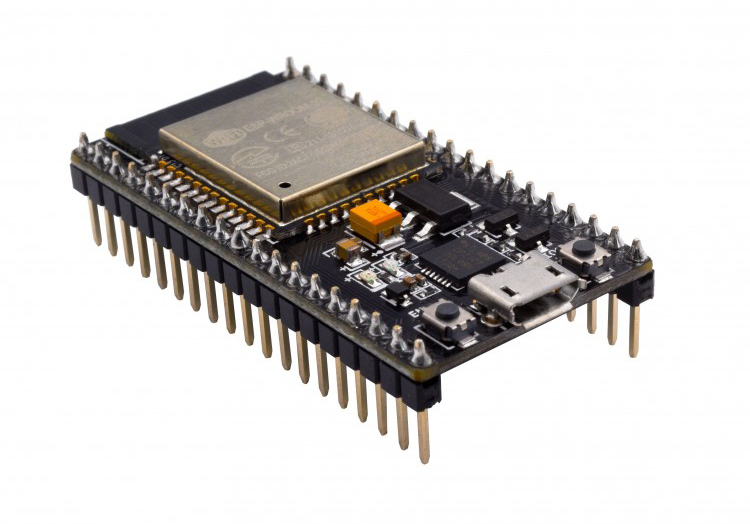
| ESP32 Dev Board | Main microcontroller with Wi-Fi |
| NEO-6M GPS Module | Provides latitude & longitude |
| 16x2 I²C LCD | Displays quake status |
| Active Buzzer | Alarm sound for nearby quakes |
| RGB LED | Visual indicator (green = calm, red = alert) |
| MicroSD Module | Stores quake history |
| Breadboard + wires | For connections |
Fetching Data from the USGS Earthquake API
We’ll use this endpoint to get the latest quakes in the Philippines (my country):
https://earthquake.usgs.gov/fdsnws/event/1/query?format=geojson
&starttime=2025-10-17
&endtime=2025-10-18
&minmagnitude=4.5
&minlatitude=5.0
&maxlatitude=20.0
&minlongitude=115.0
&maxlongitude=130.0
&orderby=time
But instead of fixed dates, we’ll dynamically replace starttime and endtime each day using the ESP32’s NTP-synced clock.
That means the device automatically fetches today’s earthquakes every 24 hours — no manual editing required.
GPS and Connections
| Module | ESP32 Pin | Notes |
|---|---|---|
| NEO-6M TX | GPIO16 (RX2) | GPS data to ESP32 |
| NEO-6M RX | GPIO17 (TX2) | Optional |
| LCD SDA | GPIO21 | I²C |
| LCD SCL | GPIO22 | I²C |
| Buzzer + | GPIO25 | Output |
| RGB LED R | GPIO26 | Red pin |
| RGB LED G | GPIO27 | Green pin |
| SD CS | GPIO5 | SD card chip select |
| SD MOSI | GPIO23 | SPI data (ESP32 → SD) |
| SD MISO | GPIO19 | SPI data (SD → ESP32) |
| SD SCK | GPIO18 | SPI clock |
Code Overview
Here’s the project flow summarized:
- Connect to Wi-Fi and get time from NTP.
- Format today’s date into YYYY-MM-DD.
- Construct the API URL dynamically.
- Fetch and parse the GeoJSON data.
- Get your GPS location (latitude & longitude).
- Compute the distance between your location and each quake’s epicenter using the Haversine formula.
- Update the LCD, RGB LED, and buzzer accordingly.
- Log quake data to the SD card.
- Host a simple web page displaying recent logs.
Example Code Snippet (Simplified)
#include <WiFi.h>
#include <HTTPClient.h>
#include <ArduinoJson.h>
#include <Wire.h>
#include <LiquidCrystal_I2C.h>
#include <TinyGPSPlus.h>
#include <HardwareSerial.h>
#include <SD.h>
#include <NTPClient.h>
#include <WiFiUdp.h>

#define BUZZER_PIN 25
#define LED_R 26
#define LED_G 27
#define SD_CS 5

LiquidCrystal_I2C lcd(0x27, 16, 2);
HardwareSerial gpsSerial(2);
TinyGPSPlus gps;
WiFiUDP ntpUDP;
NTPClient timeClient(ntpUDP, "pool.ntp.org", 28800); // +8 GMT (Philippines)

const char* ssid = "YOUR_WIFI_SSID";
const char* password = "YOUR_WIFI_PASSWORD";

void setup() {
  Serial.begin(115200);
  lcd.init(); lcd.backlight();
  pinMode(BUZZER_PIN, OUTPUT);
  pinMode(LED_R, OUTPUT);
  pinMode(LED_G, OUTPUT);

  gpsSerial.begin(9600, SERIAL_8N1, 16, 17);

  WiFi.begin(ssid, password);
  lcd.print("Connecting WiFi...");
  while (WiFi.status() != WL_CONNECTED) delay(500);

  timeClient.begin();
  while(!timeClient.update()) timeClient.forceUpdate();

  if(!SD.begin(SD_CS)) lcd.print("SD Fail!"); else lcd.print("SD Ready");
  delay(2000);
  lcd.clear();

  fetchEarthquakes();
}

void fetchEarthquakes() {
  // Get today's date
  time_t epoch = timeClient.getEpochTime();
  struct tm *tm_info = localtime(&epoch);
  char date_str[11];
  strftime(date_str, 11, "%Y-%m-%d", tm_info);

  String url = "https://earthquake.usgs.gov/fdsnws/event/1/query?format=geojson";
  url += "&starttime=" + String(date_str);
  url += "&endtime=" + String(date_str);
  url += "&minmagnitude=4.5&minlatitude=5.0&maxlatitude=20.0&minlongitude=115.0&maxlongitude=130.0&orderby=time";

  HTTPClient http;
  http.begin(url);
  int code = http.GET();
  if(code == 200) {
    DynamicJsonDocument doc(16384);
    deserializeJson(doc, http.getString());

    for(JsonObject f : doc["features"].as<JsonArray>()) {
      double lon = f["geometry"]["coordinates"][0];
      double lat = f["geometry"]["coordinates"][1];
      double mag = f["properties"]["mag"];
      const char* place = f["properties"]["place"];

      double myLat = gps.location.lat();
      double myLon = gps.location.lng();

      double dist = TinyGPSPlus::distanceBetween(myLat, myLon, lat, lon) / 1000.0;
      logToSD(place, mag, dist);

      if(dist < 200) alertUser(place, mag);
    }
  }
  http.end();
}

void alertUser(const char* place, double mag) {
  lcd.clear();
  lcd.print("ALERT!");
  lcd.setCursor(0,1);
  lcd.print(place);
  digitalWrite(LED_R, HIGH);
  digitalWrite(LED_G, LOW);
  tone(BUZZER_PIN, 1000, 2000);
  delay(5000);
  noTone(BUZZER_PIN);
  digitalWrite(LED_R, LOW);
  digitalWrite(LED_G, HIGH);
}

void logToSD(const char* place, double mag, double dist) {
  File f = SD.open("/quakes.csv", FILE_APPEND);
  if(f) {
    f.printf("%s,%.1f,%.1f km\n", place, mag, dist);
    f.close();
  }
}
Adding a Web Dashboard
With the ESP32’s Wi-Fi capability, it’s easy to serve quake logs over a local webpage.
The idea:
- The ESP32 starts a web server.
- When a user visits the ESP32’s IP address (e.g., http://192.168.1.25), the page displays the contents of quakes.csv from the SD card.
- The page auto-refreshes every 60 seconds, so you always see the latest events.
#include <WebServer.h>

WebServer server(80);

void handleRoot() {
  if (!SD.exists("/quakes.csv")) {
    server.send(200, "text/html", "<h3>No quake data logged yet.</h3>");
    return;
  }

  File file = SD.open("/quakes.csv");
  if (!file) {
    server.send(500, "text/html", "Error opening quake log.");
    return;
  }

  String html = "<!DOCTYPE html><html><head><meta charset='UTF-8'>";
	html += "<meta http-equiv='refresh' content='60'>";
	html += "<title>ESP32 Earthquake Monitor</title>";
	html += "<style>body{font-family:Arial;background:#f8f9fa;color:#333;text-align:center;}";
	html += "table{margin:auto;border-collapse:collapse;width:80%;}";
	html += "th,td{border:1px solid #aaa;padding:8px;}th{background:#004b87;color:white;}</style></head><body>";
	html += "<h1>ESP32 Earthquake Log</h1><table><tr><th>Location</th><th>Magnitude</th><th>Distance (km)</th></tr>";


  while (file.available()) {
    String line = file.readStringUntil('\n');
    int firstComma = line.indexOf(',');
    int secondComma = line.indexOf(',', firstComma + 1);
    if (firstComma > 0 && secondComma > 0) {
      String place = line.substring(0, firstComma);
      String mag = line.substring(firstComma + 1, secondComma);
      String dist = line.substring(secondComma + 1);
      html += "<tr><td>" + place + "<td><td>" + mag + "</td><td>" + dist + "</td></tr>";
    }
  }
  file.close();

  html += "</table><p><em>Auto-refreshes every 60 seconds</em></p><body></html>";
  server.send(200, "text/html", html);
}

void startWebServer() {
  server.on("/", handleRoot);
  server.begin();
  Serial.println("Web server started. Access via http://" + WiFi.localIP().toString());
}

void loop() {
  gpsSerial.listen();
  while (gpsSerial.available()) gps.encode(gpsSerial.read());

  server.handleClient();
}
How it works
- WebServer server(80); creates a basic web server on port 80.
- The handleRoot() function reads quakes.csv and formats it into an HTML table.
- The meta refresh tag reloads the page every minute automatically.
- The startWebServer() function launches the web interface after Wi-Fi connects and SD initializes.
To start the dashboard, just call this inside setup() after SD initialization:
When you connect to your ESP32’s IP (check Serial Monitor), you’ll see a simple HTML table listing quake records stored on the SD card:
| Date | Location | Magnitude | Distance |
|---|---|---|---|
| 2025-10-18 | Davao Region | 5.7 | 120 km |
| 2025-10-18 | Mindoro Strait | 4.9 | 450 km |
The full code can be downloaded here: github repo
Notes
- You can open the page from any device on the same Wi-Fi network (phone, laptop, tablet).
- To clear old logs, simply remove or format the SD card.
- You can expand this with JavaScript charting (like Chart.js) for visual magnitude trends later.
Visual Indicators
- RGB LED Green — No nearby quakes.
- RGB LED Red + Buzzer — Earthquake within ~200 km radius.
You can tweak the threshold or add yellow for “moderate distance.”
Bonus Improvements
- Add a real-time clock (RTC) backup if NTP isn’t reachable.
- Include magnitude filtering (e.g., only warn for M≥5.0).
- Replace the buzzer with a relay and a siren for stronger sound alerts
- Create a map visualization using Google Maps API for stored quakes.
Final Thoughts
With the NTP-based auto date update, GPS-based distance calculation, SD card logging, RGB alert LED, and now this web dashboard, your ESP32 Earthquake Monitor is a full-fledged, connected device worthy of a spot on your desk.
It not only helps answer “Was that an earthquake?” —it lets you prove it with data, logs, and a neat little web interface.