A data type tells the compiler what kind of value a variable holds and how much memory to reserve for it. Arduino data types deserve attention because the same type can have a different size on another board. An overflowing calculation can also produce a misleading result even when the sketch compiles.
Consider this sketch, which is meant to calculate 60000, the number of milliseconds in one minute:
void setup() {
  Serial.begin(9600);

  int minute = 60 * 1000;        // milliseconds in one minute: should be 60000
  Serial.println(minute);
}

void loop() {}
On a typical Arduino Uno AVR build, the Serial Monitor may show:
-5536
On the Uno R3, both integer literals are treated as 16-bit int values, so their multiplication exceeds the signed int range. The negative result shown here is common with AVR builds, but signed integer overflow is undefined in C++: the language does not guarantee that it wraps to this value. On an ESP32 using the Arduino core, int is 32 bits and the same calculation gives 60000.
This tutorial explains what happened. You will compare common data types on the classic Arduino Uno R3 (ATmega328P) and the ESP32, explore overflow and precision problems, and learn how to choose a type that behaves as expected.
Inside a microcontroller, every value is a pattern of bits, and each bit is either 0 or 1. Eight bits form one byte. The more bytes a variable has, the more different values it can hold:
Size
Number of different values
1 byte (8 bits)
256
2 bytes (16 bits)
65,536
4 bytes (32 bits)
4,294,967,296
A data type fixes two things for a variable:
Size: how many bytes of memory the variable occupies.
Meaning: how the program reads those bytes, for example as a whole number, a decimal number, or a character.
Types for whole numbers come in two flavors. A signed type splits its values between negative and positive numbers, while an unsigned type uses all of them for zero and above. One byte can therefore hold either -128 to 127 or 0 to 255.
You name the type when you declare a variable, as in int count = 0; or float temperature = 21.5;. From then on, the type decides which values the variable can store.
Arduino Data Types on the Uno
The table below lists the data types that Arduino sketches use most, with their sizes and ranges on an Arduino Uno:
Type
Size
Range on the Uno
bool
1 byte
true or false
char
1 byte
-128 to 127, or one character
byte
1 byte
0 to 255
int
2 bytes
-32,768 to 32,767
unsigned int
2 bytes
0 to 65,535
long
4 bytes
-2,147,483,648 to 2,147,483,647
unsigned long
4 bytes
0 to 4,294,967,295
float
4 bytes
Decimal numbers with 6 to 7 significant digits
double
4 bytes
Same as float on the Uno
Older sketches contain two more names: boolean is an alias for bool, and word is defined as unsigned int in the Uno AVR core. The ESP32 Arduino core also uses unsigned int for word, so it is 32 bits there. Do not use word when you require a fixed 16-bit value.
You do not have to memorize the sizes. The sizeof operator reports the number of bytes of any type or variable:
Its last line refers to a pointer, a variable that stores a memory address.
Arduino Data Types on the Uno vs. the ESP32
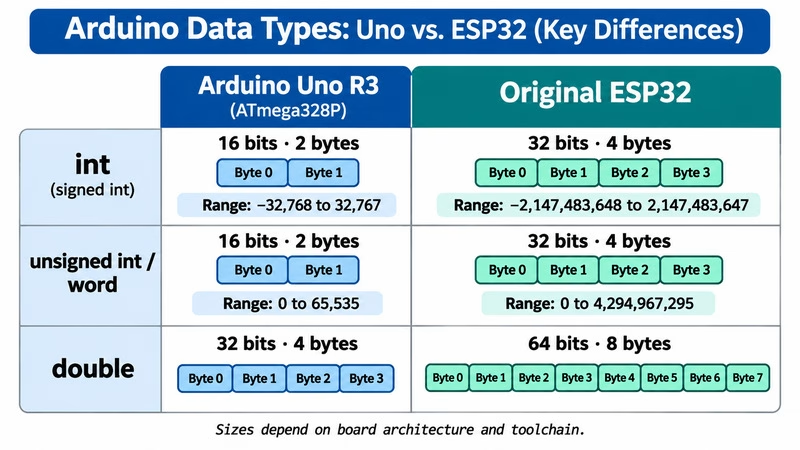
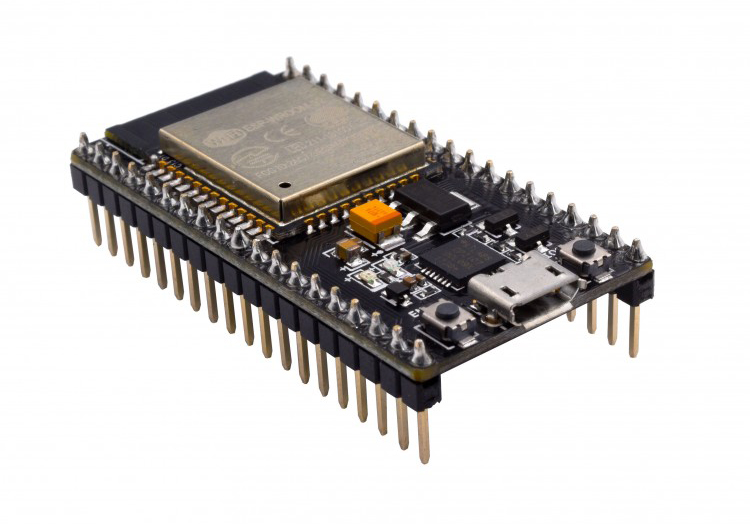
The classic Uno R3 uses an 8-bit ATmega328P, while the original ESP32 uses a 32-bit processor. C++ does not require every fundamental type to have the same width on every architecture. These differences matter when you move a sketch from one board to the other:
Type
Arduino Uno
ESP32
Consequence
int
2 bytes, up to 32,767
4 bytes, up to 2,147,483,647
Calculations that overflow on the Uno work on the ESP32
unsigned int and word
2 bytes, up to 65,535
4 bytes, up to 4,294,967,295
Same effect as for int
double
4 bytes, 6 to 7 digits
8 bytes, 15 to 16 digits
Decimal numbers gain precision on the ESP32
Pointer
2 bytes
4 bytes
Structs and arrays of pointers need more memory
char
Typically signed, -128 to 127
Typically unsigned, 0 to 255
Plain char signedness depends on the toolchain; use int8_t or uint8_t for numeric bytes
Other types in these two environments have matching sizes: bool, byte, and char occupy one byte; long and unsigned long occupy four; long long occupies eight; and float occupies four. An ESP32 is not the same thing as an Uno R4 or every other 32-bit Arduino board, so check the exact board when porting a sketch.
Two practical lessons follow. First, a sketch that works on an ESP32 can fail on an Uno, as the example at the top showed. Second, data that two different boards exchange may not line up. Fixed-width types help with both problems, although serialized data still needs a defined byte order and layout. Our guide to Structures and Padding in Embedded Systems covers the effect on structs.
Integer Overflow: When a Number Does Not Fit
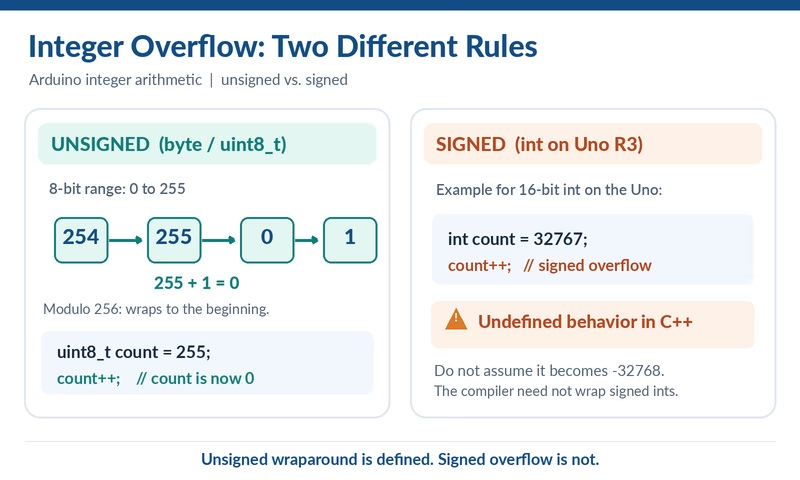
Every integer type has a largest and smallest value. A result outside that range is an overflow. With unsigned integers, the value wraps modulo 2 to the power of the number of bits, much like a car odometer. Signed overflow is different: C++ does not define a wraparound result, even if a particular compiler happens to produce one.
The sketch below pushes four variables past their limits:
void setup() {
  Serial.begin(9600);

  byte level = 255;
  level = level + 1;             // one more than a byte can hold
  Serial.println(level);

  byte lives = 0;
  lives = lives - 1;             // one less than a byte can hold
  Serial.println(lives);

  int count = 32767;
  count = count + 1;             // one more than an int can hold on the Uno
  Serial.println(count);

  unsigned int total = 65535;
  total = total + 1;
  Serial.println(total);
}

void loop() {}
A typical Uno AVR build may show:
0
255
-32768
0
The first, second, and fourth results illustrate well-defined unsigned conversion or wraparound. The negative int result is only a common outcome on the Uno, not a portable guarantee. Depending on the expression and compiler warning settings, the Arduino IDE may warn about overflow; do not assume that every bad calculation will produce a warning.
Three Overflow Traps in Everyday Sketches
Overflow rarely announces itself as clearly as in the last example. These three situations catch most beginners on the Uno.
Trap 1: Multiplying Two Small Numbers
A calculation uses the type of its operands, not the type of the variable that receives the result. In the sketch below, 60 and 1000 are both int values, so the Uno multiplies them as int values:
void setup() {
  Serial.begin(9600);

  long wrong = 60 * 1000;        // both numbers are int, so the math happens in int
  long right = 60 * 1000L;       // the L makes the math happen in long

  Serial.println(wrong);
  Serial.println(right);
}

void loop() {}
A typical AVR build produces the following output. The first line is not a guaranteed result, but the second calculation is valid:
-5536
60000
Adding L to one of the numbers turns it into a long, and the whole multiplication then happens in long. For values that are never negative, such as times, write UL for unsigned long instead.
Trap 2: A Percentage From analogRead()
On the Uno, analogRead() returns a value from 0 to 1023. Converting such a reading to a percentage looks harmless:
void setup() {
  Serial.begin(9600);

  int reading = 800;                           // stands in for analogRead(A0)

  int wrong = reading * 100 / 1023;            // 80000 does not fit in an int
  int right = reading * 100L / 1023;           // long math, then a small result

  Serial.println(wrong);
  Serial.println(right);
}

void loop() {}
A common Uno AVR result is shown below; only the second calculation is valid C++ for these values:
14
78
The intermediate result of 800 times 100 is 80,000, which does not fit in an int on the Uno. Writing 100L moves the calculation to long.
Trap 3: Time in an int
Both millis() and micros() return an unsigned long. Storing their result in an int cuts it down:
void setup() {
  Serial.begin(9600);

  unsigned long elapsed = 40000;               // 40 seconds in milliseconds

  int wrong = elapsed;                         // an int stops at 32767
  unsigned long right = elapsed;

  Serial.println(wrong);
  Serial.println(right);
}

void loop() {}
On the Uno AVR toolchain, the narrowing conversion typically gives the following output:
-25536
40000
A signed 16-bit int holds only 0 to 32767 when counting positive milliseconds, or about 32.767 seconds. Assigning a larger unsigned value to a signed int that cannot represent it is implementation-dependent. By contrast, the 32-bit unsigned long result of millis() rolls over after about 49.7 days. Store timestamps in unsigned long and measure intervals by subtraction, for example millis() - lastTime >= interval.
Fixed-Width Types: int16_t, uint32_t, and Friends
Because int changes size from board to board, C++ also offers types whose names state their size. These fixed-width types have the indicated bit widths on both the Uno and ESP32 (and on other platforms that provide them):
Type
Size
Range
int8_t
1 byte
-128 to 127
uint8_t
1 byte
0 to 255
int16_t
2 bytes
-32,768 to 32,767
uint16_t
2 bytes
0 to 65,535
int32_t
4 bytes
-2,147,483,648 to 2,147,483,647
uint32_t
4 bytes
0 to 4,294,967,295
Read the names as follows: u stands for unsigned, the number gives the bits, and _t marks a type. The familiar byte is simply another name for uint8_t. You declare variables of these types like any others:
Fixed-width types pay off whenever the size matters:
Data that leaves the board: values sent over serial, I2C, or radio to a different kind of board.
Stored data: values saved to EEPROM or an SD card.
Structs with a fixed layout: the structs tutorial shows how sizes add up.
Sketches for several boards: code that must behave the same on the Uno and the ESP32.
For local counters and pin numbers, byte and int remain useful. A fixed-width integer only fixes the width: when exchanging multibyte data between systems, also define endianness, byte order, and any struct padding.
float and double: Decimal Numbers and Their Limits
Whole-number types cannot store fractions. For values such as 21.5 or 3.14159, use a float. It occupies 4 bytes on both boards and covers a huge range of magnitudes, but it keeps only 6 to 7 significant digits.
The sketch below tests those limits:
void setup() {
  Serial.begin(9600);

  float third = 1.0 / 3.0;
  Serial.println(third, 10);             // ten digits after the decimal point

  double precise = 1.23456789012;
  Serial.println(precise, 10);

  float total = 0;
  for (byte i = 0; i < 10; i++) {
    total = total + 0.1;                 // add 0.1 ten times
  }
  Serial.println(total, 7);
  Serial.println(total == 1.0 ? "equal" : "not equal");
}

void loop() {}
Typical Uno output illustrates three precision limits (the last displayed digits can vary slightly with compiler and core versions):
0.3333333492
1.2345678806
1.0000001
not equal
Limited digits: only the first seven digits or so are correct, and the rest is noise.
No extra precision from double: a double has the same 4 bytes as a float on the Uno, so the second line loses its last digits. An ESP32 stores a double in 8 bytes and keeps all of them.
Unreliable comparisons: adding 0.1 ten times does not give exactly 1. For approximate results, do not depend on exact equality; compare against a suitable tolerance, such as abs(total - 1.0) < 0.001.
Integer Division
A related surprise involves no float variable at all. Dividing one whole number by another gives a whole number, and the fraction simply disappears:
void setup() {
  Serial.begin(9600);

  Serial.println(5 / 2);                 // int divided by int
  Serial.println(5 / 2.0);               // one decimal number is enough

  float ratio = 5 / 2;                   // still int math, converted afterwards
  Serial.println(ratio);
}

void loop() {}
This sketch prints 2, then 2.50, then 2.00. To get a decimal result, write at least one of the numbers with a decimal point.
The ATmega328P has no hardware floating-point unit, so floating-point operations are handled in software and may cost more time and program memory than integer arithmetic. Actual execution time depends on the expression, compiler optimization, and whether the calculation is constant-folded.
char and bool: Characters and Flags
A char holds one character, such as a letter or digit, in a single byte. Behind the scenes, the character is a number from the ASCII table, in which the letter A has the code 65. A bool holds one of two values, true or false, and suits flags and the results of comparisons.
The sketch below prints a character, its code, and a flag:
void setup() {
  Serial.begin(9600);

  char letter = 'A';
  Serial.println(letter);                // the character itself
  Serial.println((int)letter);           // the number behind it

  char value = 200;                      // a number above 127 in a char
  Serial.println((int)value);

  bool ready = true;
  Serial.println(ready);
}

void loop() {}
On an Arduino Uno, the output is:
A
65
-56
1
Its third line exposes another difference between boards. On typical Uno AVR builds, plain char is signed and the assignment of 200 produces -56; on the ESP32 Arduino toolchain, plain char is generally unsigned and may print 200. The signedness of plain char is implementation-dependent, and converting 200 to an 8-bit signed char is not a portable way to produce -56. Keep char for text, and use byte or uint8_t for small numbers. Text itself lives in char arrays or String objects, which the arrays tutorial introduces.
Suffixes and Casts: Controlling the Type of a Calculation
Two tools let you decide which type a calculation uses. The first is a suffix, a letter that sets the type of a number written in the code:
Suffix
Type of the number
Example
None
int, if the number fits
1000
U
unsigned int
50000U
L
long
100000L
UL
unsigned long
86400000UL
A cast is the second tool. It converts a value to another type for one calculation. Write the target type in parentheses in front of the value:
void setup() {
  Serial.begin(9600);

  int total = 7;
  int count = 2;

  Serial.println(total / count);                   // int math
  Serial.println((float)total / count);            // the cast forces float math

  unsigned long day = 24UL * 60 * 60 * 1000;       // milliseconds in a day
  Serial.println(day);
}

void loop() {}
This sketch prints 3, then 3.50, then 86400000. Without the UL, the intermediate multiplication overflows a 16-bit signed int on the Uno; any particular resulting number is not guaranteed by C++.
A cast to a smaller type cuts the value down, so (int)3.99 gives 3 and (byte)300 gives 44. To convert between numbers and text, see Converting Between Data Types in Arduino.
How to Choose an Arduino Data Type
For most variables, the choice follows from what you want to store:
You want to store
Use
Reason
A pin number or a count up to 255
byte
One byte, never negative
A flag that is on or off
bool
States the intent clearly
A sensor reading or a general counter
int
Holds 0 to 1023 with room to spare
A result of millis() or micros()
unsigned long
Matches what these functions return
A large count or a big multiplication
long
Reaches about 2 billion
A temperature, voltage, or other decimal value
float
Fractions with 6 to 7 digits
A character
char
One letter or symbol
A value that travels to another board or into storage
int16_t, uint32_t, and so on
Same size everywhere
Two rules of thumb complete the picture. First, choose a type with enough range for the largest value and intermediate calculation you expect. Small types save memory, which matters on an Uno with its 2,048 bytes of SRAM: an array of 100 long values takes 400 bytes, whereas 100 byte values take 100.
Smaller types are not always faster. C++ promotes small integer operands for many expressions, and 32-bit processors often handle 32-bit arithmetic efficiently. On an Uno, large integer division and software floating-point operations can be expensive, but the exact cost depends on the code and compiler settings.
Second, if the required range is uncertain, choose a type with more headroom and check intermediate expressions. A few extra bytes cost far less than a wrong result.
Common Data Type Warnings and Fixes
The compiler notices many type problems, but it reports most of them as warnings, which the Arduino IDE hides by default. To see them, set Compiler warnings to All in the preferences. The table below pairs each message or symptom with its cause and fix.
Message or symptom
Cause
Fix
integer overflow in expression (warning)
A calculation with fixed numbers, such as 60 * 1000, exceeds the range of int.
Add L or UL to one of the numbers.
overflow in implicit constant conversion (warning)
A number does not fit the variable, as in int big = 100000; on the Uno.
Choose a larger type.
large integer implicitly truncated to unsigned type (warning)
A number exceeds an unsigned type, as in byte b = 300;.
Choose a larger type.
comparison is always true due to limited range of data type (warning)
A loop counter can never reach its limit, as in for (byte i = 0; i < 300; i++), so the loop never ends.
Declare the counter as int.
comparison between signed and unsigned integer expressions (warning)
An int meets an unsigned value, such as the result of sizeof.
Give both sides the same kind of type.
call of overloaded 'println(uint64_t&)' is ambiguous
On the Uno, Serial.println() cannot print 64-bit integers.
Stay with 32-bit types, or print the value in two parts.
A result is negative or far too small
An intermediate result overflowed.
Force the calculation into long with an L.
A division always gives a whole number
Both numbers in the division are whole numbers.
Add a decimal point or a cast.
The Serial Monitor shows ovf
The floating-point printing routine cannot represent the magnitude or encounters an overflow/invalid value; behavior varies by Arduino core.
Check the computed value and scale it or print it in a different form.
Frequently Asked Questions
How Many Bytes Is an int in Arduino?
That depends on the board. An int takes 2 bytes on the Arduino Uno and 4 bytes on the ESP32. When the size matters, use int16_t or int32_t instead.
What Is the Difference Between float and double in Arduino?
On the Arduino Uno, none: both take 4 bytes and keep 6 to 7 significant digits. A double on the ESP32 takes 8 bytes and keeps 15 to 16 digits, while a float stays at 4 bytes.
What Happens When millis() Overflows?
After about 49.7 days, the 32-bit value returned by millis() wraps to zero. Comparing elapsed time with unsigned subtraction, as in millis() - start >= interval, remains valid across the wrap when you keep the timestamps in unsigned long, choose a sensible interval, and check the timer regularly.
What Does uint8_t Mean?
It names an unsigned integer with exactly 8 bits, which holds 0 to 255. Arduino's byte is another name for the same type.
Conclusion
A data type sets the size of a variable and the range of values that it can hold.
On the Uno, an int has 2 bytes and stops at 32,767, while on the ESP32 it has 4 bytes.
Unsigned overflow wraps predictably, but signed overflow is undefined. Use 60 * 1000L or 60 * 1000UL on the Uno instead of multiplying in 16-bit int.
Fixed-width types such as int16_t and uint32_t keep the same size on every board.
A float holds about 6 to 7 significant digits. On the Uno R3, double is also 32-bit; on the ESP32 Arduino core, double is 64-bit.